I don't keep a separate tracker. Every piece of work on Gitsu starts as a conversation with Claude, becomes a GitHub issue that Claude files, and ends when Claude closes that issue. My job is to decide what matters and to watch the board while the work happens.
This post walks through that loop the way I run it: what I say, what Claude does, and what I look at. Every other page on this site links back here, because this is the workflow Gitsu was built for.
What does the loop look like, end to end?
It has five steps, and I do two of them:
- I talk the idea through with Claude. I use a planning skill called wayfinder, which keeps asking questions until the idea has a shape: what it is for, what is in, what is out.
- Claude files the issues. Once the plan holds, Claude turns it into GitHub issues on my project board, each with a Priority (P0, P1, P2).
- I watch the board and the roadmap. I open the project in Gitsu, on the Kanban board or the Roadmap, and see the new issues land.
- Claude works the issues and closes them. While it works on one, that card carries the
agent-workinglabel. When the work is done, Claude closes the issue. - Next morning, I ask what's next. "What's my next P0?", either in Claude Code or in Gitsu's Ask panel.
Nothing in that list leaves GitHub. The issues, the Priority column, the labels and the closed state are all ordinary GitHub data. Gitsu reads and writes them; it holds no copy that matters.
Why plan in a conversation instead of a ticket form?
Because the plan is the hard part, and a form doesn't argue back. When I open a blank issue I write what I already think. When I talk it through with Claude I find out what I didn't think of: the case I skipped, the piece that should ship first, the part that isn't worth building.
The conversation is also where priority gets decided. By the end I know which pieces block a launch (P0), which ones I want soon (P1), and which can wait (P2). Claude carries that straight into the issues, so I don't do a second triage pass.
How does Claude file the issues on my board?
Claude files them through Gitsu's MCP server, which gives it nine write tools on the board. The one that files work is create_item: it creates an issue on a board with any column values you name, so a new issue arrives with its Priority already set. If a value can't be set, the reply names it and the issue is still created, so Claude doesn't file a duplicate.
The other eight write tools are set_field_value, add_comment, add_labels, remove_labels, close_item, reopen_item, start_work and finish_work. There is no delete tool. Claude can move a card, comment on it or close it, but it can't make an issue disappear.
You can do all of this with plain GitHub tools too. The gh CLI creates issues, and gh project item-edit sets a Priority field by name, one field per call. That works, and it's free. What Gitsu adds is that Claude sets several columns as it creates the issue, and a wrong value is refused with the list of legal ones. Connect Claude to GitHub Projects has the setup for both.
What do I watch while Claude works?
I watch the board. In Gitsu a project draws as a List, a Board or a Roadmap, and I switch between the last two.
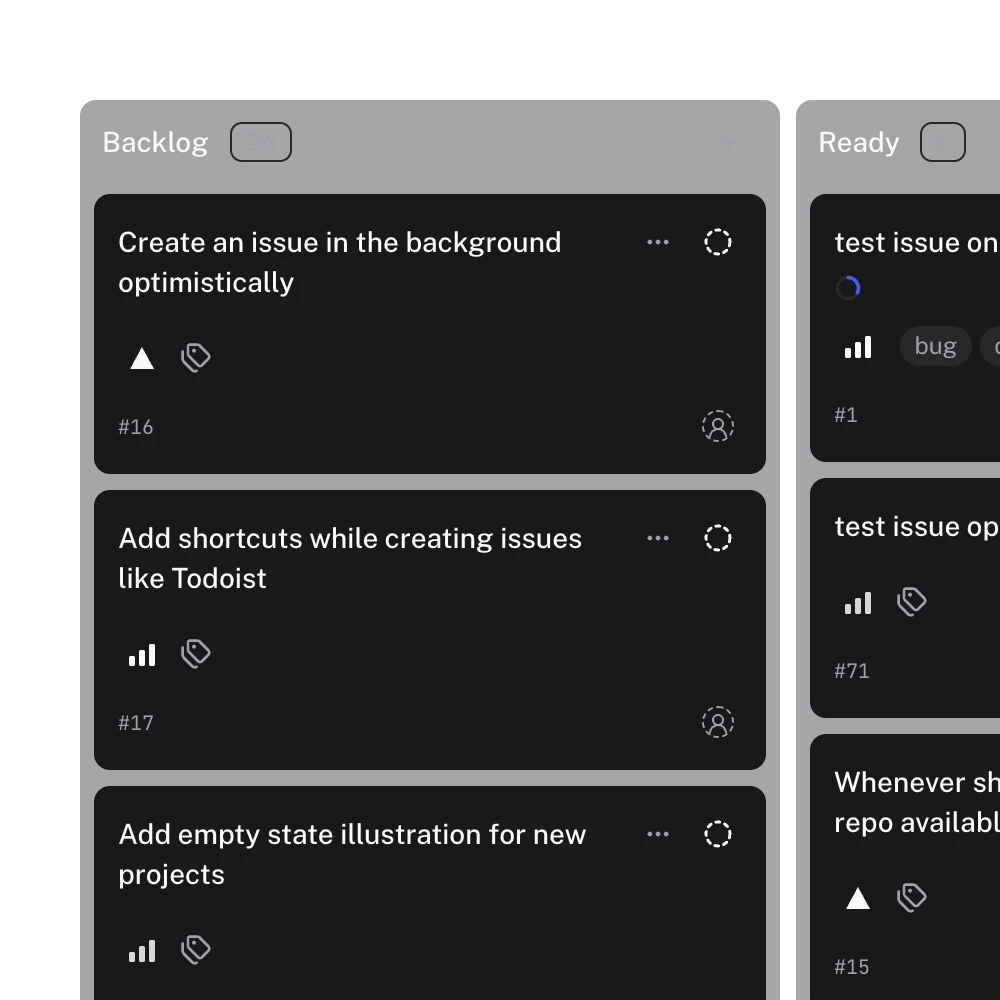
The Board shows where every issue sits by Status. The card Claude is working on carries the agent-working label: Claude puts it on with start_work when it picks up an issue and takes it off with finish_work when it stops. The board draws that label as a live working animation, and the Agent working quick filter shows only the open items an agent is on. It marks liveness, not authorship: the label is there only while the work is happening.
The Roadmap draws each issue as a bar across a date axis, from a start date field to a target date field. I use it to see whether this week's P0s fit this week.
Mostly I just look. When a card moves to Done and the issue closes, I review the pull request. When something looks wrong, I say so in the conversation, and Claude adjusts the issue.
How do I pick up the next morning?
I ask one question: "What's my next P0?"
- In Claude Code, the Gitsu MCP server answers from
list_items, which filters the board on any column. Priority P0 is a filter like any other. Reads work even when the Gitsu app is closed; they come from Gitsu's local cache and say how old it is. Two more read tools,milestone_statusandrecent_work, cover "where does the release stand" and "where did we leave off". - In Gitsu, the Ask panel has built-in questions. "What's next?" asks what to work on next, and "Most urgent" lists P0s and launch blockers first. Ask runs on your own AI: your AI client on the Mac, or your own model key on the web.
Either way, the answer comes from the same board Claude filed the night before. Then I start the loop again.
What are the trade-offs?
The loop has limits, and some of them are on purpose:
- Writes need the app open. Claude can read the board with Gitsu closed, but creating, moving and closing issues need the Gitsu app running. If it isn't, the tool result says so and nothing is written.
- The working label is opt-in. Starting an agent run in Gitsu's agent panel doesn't add
agent-working. Onlystart_workdoes, so the agent has to call it. - Only board items. Gitsu MCP sees issues that are on a project board. An issue that isn't on any board is invisible to it.
- No sort in
list_items. It filters but doesn't order, so "next" comes from Claude reading the P0s and choosing, or from Ask's question. - It costs money. Board reads through Gitsu MCP and Ask are part of Pro. See pricing for the plans.
If you only need Claude to read and close the odd issue, gh or GitHub's own MCP server covers it. The point of this setup is the full loop on one board, with a visible marker of what the agent is doing.
How do I run the same loop?
- Put your issues on a GitHub Projects board with a Priority field.
- Install the Gitsu desktop app and open that board. On launch it connects its MCP server to Claude Code.
- Plan the next feature with Claude, then ask it to file the plan as issues on the board with priorities.
- Watch the Board or Roadmap in Gitsu while Claude works and closes them.
- Next morning, ask Claude Code or Gitsu's Ask "What's my next P0?"
Open your board in Gitsu and ask Claude Code for your P0s: it's the same GitHub board, with one place to plan, one to watch and one to ask, and no second tracker to keep in sync.
How we checked
The owner's own daily loop for building Gitsu: Claude plans, files, labels and closes GitHub issues through Gitsu MCP, and he reads the board, the roadmap and Ask instead of a second tracker.
Frequently asked questions
Can Claude Code create GitHub issues with a priority?
Yes. With the Gitsu MCP server connected, Claude Code calls create_item to open an issue on your board and can set column values such as Priority in the same call. A value that cannot be set is named in the reply and the issue is still created.
How do I see which issue Claude is working on right now?
Gitsu MCP has a start_work tool that puts the agent-working label on the issue and a finish_work tool that removes it. The board animates that label, and the Agent working quick filter lists the open items that carry it.
How do I ask Claude what to work on next?
In Claude Code with Gitsu MCP, ask for open items with Priority P0; list_items filters on any board column. In Gitsu, open Ask and pick "What's next?" or "Most urgent", which reads P0s and launch blockers first.
Does this need the Gitsu app open?
Reads work with the app closed. Writes such as creating, moving or closing an issue need the Gitsu app open; if it is closed, the tool result says so.
Is it free?
No. Gitsu MCP board reads and Ask are part of Pro. The pricing page has the current plans.
Try it on your own boardsGitsu opens your GitHub Projects boards in the browser. Sign in with GitHub and work on the same issues your team already uses.
Open the web app