To connect Claude to GitHub Projects, add an MCP server that can read and write Projects boards to Claude Code or Claude Desktop. Two servers do this: GitHub's official MCP server with its projects toolset turned on, and the server that ships inside the Gitsu desktop app, which writes itself into Claude's config when Gitsu launches.
The GitHub connector on claude.ai is a different route. It syncs repository files into a chat or a claude.ai Project, and Anthropic's help page says it does not retrieve "commit history, PRs, or other metadata", so it cannot see a board. And a claude.ai Project, Claude's own workspace for knowledge files, is a different thing from a GitHub Project board; this guide is about the second.
This guide sets up each server in Claude Code, Claude Desktop and Cursor and says what Claude can read and write under each. For every Claude surface side by side, start at connect GitHub to Claude. Once a server is connected, the Claude Code GitHub issues workflow runs an issue from pick-up to review.
Which MCP server should you use for GitHub Projects?
Use GitHub's official server if you want the widest reach and no extra app: repositories, pull requests, Actions and Projects, from any MCP client on any operating system. Use Gitsu's server if you want an agent to write to your board inside fixed limits, and you already run the Gitsu desktop app.
| GitHub's official server | Gitsu's MCP server | |
|---|---|---|
| Where it runs | Hosted by GitHub, or locally in Docker or as a binary | A process that ships inside the Gitsu desktop app |
| Sign-in | A personal access token (or OAuth on the local build) | The token the Gitsu app stored in the keychain |
| Projects reads | projects_list, projects_get | list_items, get_item, list_projects, list_fields |
| Projects writes | projects_write: create projects, add, update and delete items, views, iteration fields, status updates | Nine tools: field values, labels, comments, close, reopen, create an issue, start and finish work |
| Cards in chat | No Projects card in the official toolset's documented MCP Apps support | Five MCP Apps view families in compatible hosts: item, list, board, column and write-result cards |
| Limits on writes | Credential permissions, selected tools/toolsets and read-only mode | Desktop switch for subsequent Gitsu MCP writes; no delete tool |
| Beyond Projects | Repositories, issues, pull requests, Actions and more | Board work only |
| Cost | Free | Paid Seat: Pro for one Seat, or Team for multiple Seats |
GitHub's server wins on breadth. It can create a project, add an issue to one and delete an item, and Gitsu's cannot do any of those. Gitsu's server wins on bounding what an agent may do to a board you care about.
What does GitHub's official MCP server cover for Projects?
GitHub's server covers Projects through a projects toolset, and that toolset is off by default. The default set is context, repos, issues, pull_requests and users, so a server added with the standard URL cannot see your board until you turn Projects on.
With the toolset on, three tools appear:
projects_listlists projects, their fields, items, views and status updates. It accepts GitHub's project filter syntax, and it returns only titles unless you pass the field names you want.projects_getreads one project, field, item, view or status update.projects_writecreates a project, adds an issue or pull request to one, updates or deletes items (up to 50 per batch update), creates iteration fields, manages views and posts status updates.
Reads ask for the read:project scope and writes for project, according to the README. What it does not do is decide which board you mean: every call names an owner and a project number.
How do you add GitHub's MCP server to Claude Code?
Run GitHub's documented command with your token in place of the placeholder:
claude mcp add --transport http github https://api.githubcopilot.com/mcp -H "Authorization: Bearer YOUR_GITHUB_PAT"
That registers the hosted server with the default toolsets. To reach your board, GitHub's remote-server table gives Projects its own URL, https://api.githubcopilot.com/mcp/x/projects, and a read-only one at https://api.githubcopilot.com/mcp/x/projects/readonly. Register the Projects URL under a second name if you want both sets of tools.
Check the result with claude mcp list, then ask the agent to list the projects on your account.
How do you add GitHub's MCP server to Cursor?
Open ~/.cursor/mcp.json and add GitHub's documented entry, then restart Cursor:
{
  "mcpServers": {
    "github": {
      "url": "https://api.githubcopilot.com/mcp/",
      "headers": {
        "Authorization": "Bearer YOUR_GITHUB_PAT"
      }
    }
  }
}
GitHub's guide notes that this needs Cursor 0.48.0 or later and that the hosted server takes a personal access token rather than OAuth in Cursor. As in Claude Code, swap the URL for the Projects one to see your board.
How do you connect Claude Desktop to GitHub Projects?
Claude Desktop loads local MCP servers from claude_desktop_config.json, which on macOS lives at ~/Library/Application Support/Claude/claude_desktop_config.json. Open it from Settings → Developer → Edit Config, add a server under mcpServers, then quit and restart Claude Desktop so it starts the server.
With Gitsu, there is nothing to paste. At launch the Gitsu desktop app adds a gitsu entry to that file's mcpServers, keeping every other key in it. The entry has a command and args and no type key, because Claude Desktop's config launches local processes only. Gitsu writes only when Claude's own folder exists, so it never creates a config for a Claude Desktop that is not installed.
Claude Desktop sometimes rewrites its config file and drops entries it did not write. Gitsu handles that case (#911): each time you bring Gitsu's main window forward, it checks the file and puts the gitsu entry back if it is missing, unless you disconnected Claude Desktop in Gitsu's settings. Restart Claude Desktop after the entry comes back.
With GitHub's server, GitHub's install guide gives a Docker-based entry for the same file, signed in with OAuth on first use or with a personal access token in env. It also notes that its hosted server cannot be added as a Claude Desktop custom connector, because that server's OAuth needs a registered GitHub App that the custom-connector flow does not support. To get the board tools, set GITHUB_TOOLSETS in the entry's env to a list that includes projects and pass it into the container with -e GITHUB_TOOLSETS in args; the board tools are off by default.
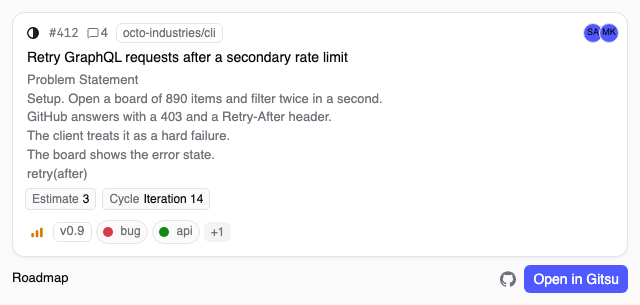
Claude Desktop renders Gitsu's MCP Apps cards in chat, so a board read can come back as an item card or a board view rather than text. The MCP views page shows them.
What does Gitsu's MCP server cover?
Gitsu's server registers fifteen routes. It answers five itself, passes nine writes to the running app, and keeps one app-only route for its MCP Apps views:
- Reads, with the app closed:
list_itemsfilters on state, assignee, label, title search, archived, and any column on the board.get_itemreads one item in full.list_projectslists the boards you can see.list_fieldslists the board's columns and the values each one accepts. - Writes, through the app:
set_field_value,add_comment,add_labels,remove_labels,close_item,reopen_itemandcreate_item. - Housekeeping:
start_workandfinish_workput and remove anagent-workinglabel so the board shows the item is in progress, andsurface_infochecks that the app is running without reading or writing board data. - App-only MCP Apps route:
open_in_gitsusends agitsu://link to the running desktop app. A host that advertisesio.modelcontextprotocol/uireceives it withvisibility: ["app"], so the model never sees it. A host without MCP Apps omits this route and sees the model-facing fourteen-route set.
Two behaviours set it apart. It works out which board you mean from the folder the agent runs in: it reads the folder's git remote and uses the one project linked to that repository, and every answer names the board it read. And it filters on a board's own columns by name, so a Priority column is one argument:
{ "fields": { "Priority": "P0" } }                    // the P0 items
{ "fields": { "Priority": "P0", "Status": "Todo" } }  // AND, like every other filter
A wrong guess comes back with the real vocabulary, such as the values Priority accepts, instead of an empty list.
When the host advertises MCP Apps, the sidecar attaches ui:// resources to the relevant tools. Compatible hosts can render five view families beside the text answer: an item card, item lists, boards, columns and write-result cards. Other hosts keep the text response. Read cards can open the item on GitHub or in Gitsu; the Gitsu action uses the app-only open_in_gitsu route and needs the desktop app running. The GitHub Projects MCP views page shows the cards and their boundaries.
Which Gitsu capabilities need the desktop app?
All of them. The MCP server, the agent panel and the agent-safety layer are part of the desktop app, which requires a paid Seat through Pro or Team. The free plan is the web app, and its plan card lists AI access and the desktop app as not included. See the pricing page for the current plans. The desktop app is built for Macs with Apple silicon; there is no Windows or Linux build. Gitsu's server talks to GitHub's API at api.github.com, so it reaches boards on github.com.
Reads work while the app is closed, because the server reads GitHub with the token the app stored. Writes do not. With the app closed, a write fails with a message for you: open Gitsu and ask again. Nothing is queued to land later.
How do you connect Gitsu's MCP server to Claude Code or Cursor?
Install the app and launch it.
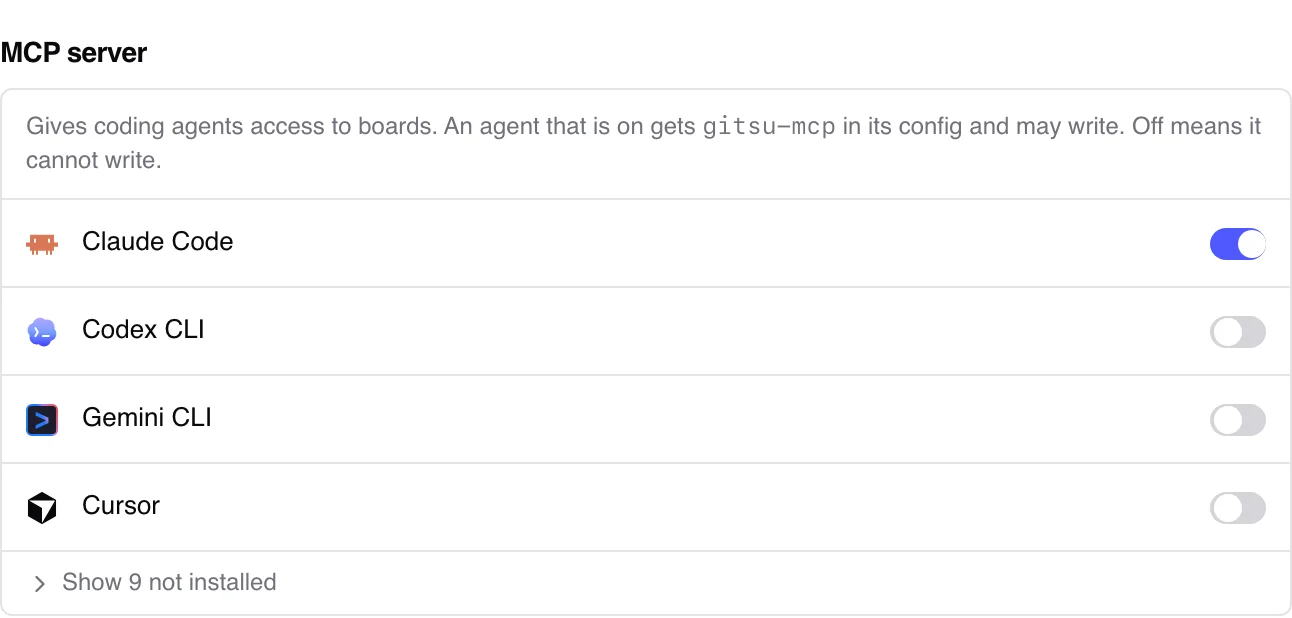
At every launch the Gitsu desktop app writes the server into the config file of each supported agent it finds, Claude Code, Claude Desktop and Cursor included, and agent writes are on by default. Settings, MCP server, lists each agent as Connected or Disconnected; disconnecting one removes the entry and keeps it out.
The entry Gitsu writes starts from this spec in its source:
export const GITSU_MCP_SPEC: Record<string, unknown> = {
  type: 'stdio',
  command: GITSU_MCP_BINARY,
  args: ['--stdio'],
}
The binary placeholder is gitsu-mcp; the config entry is gitsu. Before writing, Gitsu replaces command with the absolute path of the server inside the app bundle, and it re-checks that path each time the app launches so a moved app does not leave a broken entry. For Claude Code the entry lands under mcpServers in ~/.claude.json. For Cursor it lands under mcpServers in ~/.cursor/mcp.json, with only the command and args keys, because Cursor tells server types apart by shape and has no type key.
You can also register it by hand in Claude Code with the line from Gitsu's developer docs, using the real path to the server:
claude mcp add gitsu -- /abs/path/to/gitsu-mcp --stdio
A hand-registered server can read and write at once, as long as Agents can write to your boards is on in Settings.
The current config entry is named gitsu; the executable remains gitsu-mcp. Restart the agent's session after its configuration changes. In Claude Code, claude mcp list should include gitsu. For a manual entry, use the actual bundled executable path rather than a guessed path or a name that depends on your shell's PATH.
What can Claude read and write on the board?
Claude can read items, fields and boards through either server; what it can change depends on which one you connect.
| Task on the board | GitHub's server (projects toolset) | Gitsu's server |
|---|---|---|
| List boards you can see | Yes, projects_list | Yes, list_projects |
| Read items, filtered by a column's value | Yes, projects_list with a query | Yes, list_items with fields |
| Read the columns and their allowed values | Yes, projects_list / projects_get | Yes, list_fields |
| Move a card (set Status or any field) | Yes, projects_write | Yes, set_field_value |
| Add or remove labels, comment | Through the issues toolset | Yes, add_labels, remove_labels, add_comment |
| Create, close or reopen an issue | Through the issues toolset | Yes, create_item, close_item, reopen_item |
| Mark an item as being worked on | No | Yes, start_work / finish_work label |
| Create a project, add an item to one | Yes, projects_write | No |
| Delete a project item | Yes, projects_write | No |
| Change assignees or milestones | Through the issues toolset | No |
What can the agent write through Gitsu, and what stops it?
Through Gitsu MCP, the agent can set a field, add or remove labels, comment, close, reopen, or create an issue. This tool list has no issue deletion, project-item removal or assignee/milestone operation. Other tools available to the agent may offer those operations.
Inside that set, three limits apply:
- One switch. Agents can write to your boards in Settings is on by default. Off, the app refuses subsequent Gitsu MCP writes, and reads keep working. It does not cancel a write already accepted or revoke other GitHub credentials.
- Server-confirmed replies. A write reports success only after GitHub accepts it. If the app quits mid-call, the agent is told the result is unknown and to re-read before retrying.
- Default attribution. Comments and new issues written through Gitsu MCP carry a hidden marker by default. Gitsu displays the agent name from a marked comment as self-reported. The MCP tools cannot turn the mark off.
Gitsu checks the calling MCP binary, but cannot prove which agent launched it. The agent names are self-reported, and per-agent configuration rows do not replace credential restrictions. The write switch covers Gitsu MCP only. Review gh, other MCP servers and separate tokens if the agent must have no GitHub write access. The agent safety page explains this boundary.
How do you fix a connection that does not work?
Use a read-only acceptance sequence before asking for changes:
- Confirm the account holds a paid Seat and the agent lists the
gitsuserver. - Ask for
surface_infowith Gitsu open. It reports whether the relay reaches the app and identifies the caller it saw; it reads and writes no board data. - Ask
list_projects, choose the intended board, and pass itsproject_idexplicitly tolist_fieldsandlist_itemswhen discovery is ambiguous. - Inspect the answer's source and age. Request a fresh answer when the current state matters.
- Keep writes off during a read-only setup test. The global switch refuses subsequent Gitsu MCP writes; other servers and credentials need their own restrictions.
Distinguish missing sign-in, a missing paid Seat, discovery ambiguity and unavailable data before assuming registration is wrong.
Ask the agent a read question first, such as "list the P0 items on this board". A read touches nothing, so it is a safe test of both servers.
With GitHub's server, the answer should list items from the project you named. If the agent says it has no Projects tools, the server is registered with the default toolsets; register the Projects URL.
With Gitsu's server, every answer starts by naming the board it read and says when that board was discovered from your folder. If it is the wrong board, pass project_id to choose another. Five other answers point at a setup problem:
- The server fails to start. You are signed out of the Gitsu app. The server reads the stored token when it starts, before the agent connects, so it fails early rather than answering with errors later.
- It lists several boards. The repository is linked to more than one project, and neither tie-break applied. With several linked boards the server uses the one open in Gitsu, then the most recently opened one, and asks you to pick by ID only when neither exists. See how Gitsu MCP picks a board.
- It finds no board. The board is linked to no repository, or the folder has no git remote. A board like that is reachable only by passing its ID.
- Claude Desktop shows no gitsu tools. Quit and restart Claude Desktop: it reads its config only at start. If the entry is missing from
claude_desktop_config.json, bring Gitsu's window forward so it writes it back, then restart Desktop again. Claude Desktop keeps its MCP logs in~/Library/Logs/Claude. - Writes are refused. Check that the desktop app is running, the account holds a paid Seat and the global Agents can write to your boards switch is on. Disconnecting an agent's config row affects new sessions; it is not a per-call permission switch for a session already running.
Where to go next
The quickest route to a board Claude can work on is to install Gitsu, sign in and launch it: the gitsu entry lands in Claude Code and Claude Desktop with no token to paste, and Claude can move cards within nine write tools that cannot delete anything. With either server connected, the Claude Code GitHub issues workflow walks through handing an issue to the agent and reviewing what it did. If you are new to Gitsu, getting started with the Gitsu Web App covers sign-in and choosing boards.
How we checked
The exact MCP entry Gitsu writes into Claude Code's, Claude Desktop's and Cursor's config files, how it puts the Claude Desktop entry back when Desktop drops it (#911), the limits its relay puts on agent writes, and the app-only MCP Apps route, read from Gitsu's own source, set beside a check of the Projects tools in GitHub's official server on 2026-10-11.
- https://github.com/github/github-mcp-server
- https://github.com/github/github-mcp-server/blob/main/docs/installation-guides/install-claude.md
- https://github.com/github/github-mcp-server/blob/main/docs/installation-guides/install-cursor.md
- https://github.com/github/github-mcp-server/blob/main/docs/remote-server.md
- https://github.com/github/github-mcp-server/blob/main/docs/insiders-features.md
- https://support.claude.com/en/articles/10167454-use-the-github-integration
- https://support.claude.com/en/articles/11175166-getting-started-with-custom-connectors-using-remote-mcp
- https://modelcontextprotocol.io/docs/develop/connect-local-servers
Frequently asked questions
Does GitHub's official MCP server support GitHub Projects?
Yes, through a projects toolset that is not in the default set. Enable it with the projects URL on the hosted server or the --toolsets flag on a local one. It exposes projects_list, projects_get and projects_write.
Can Claude Desktop update a GitHub Projects board?
Yes, through a local MCP server in claude_desktop_config.json. Gitsu's desktop app writes a gitsu entry there at launch and puts it back if Claude Desktop drops it. GitHub's guide gives a Docker-based entry for its own server, because its hosted server's OAuth is not supported as a Claude Desktop custom connector.
Is this the same as claude.ai Projects?
No. A claude.ai Project is a workspace inside Claude with its own knowledge files. A GitHub Project is a board of issues and pull requests on github.com. The GitHub connector can add repository files to a claude.ai Project; it does not read GitHub Projects boards.
Do I need a personal access token for Gitsu's MCP server?
No. It reads the GitHub token the Gitsu desktop app stored in the system keychain when you signed in. There is no second sign-in, and signing out of the app cuts the server off too.
Can the agent delete issues or project items through Gitsu?
No. Gitsu's server has no delete, assignee or milestone tools. Its nine write tools set field values, add or remove labels, comment, close, reopen, create an issue, and start or finish work.
Try it on your own boardsGitsu opens your GitHub Projects boards in the browser. Sign in with GitHub and work on the same issues your team already uses.
Open the web app