Yes, Claude Code can work on GitHub issues. From your terminal it reads and updates issues through the gh CLI or an MCP server; on GitHub, the Claude Code GitHub Action picks up an issue when someone writes @claude in it. Set up one of those first, then run issues through the loop below.
How do you connect Claude Code to GitHub issues?
Connect it one of three ways, depending on where you want the work to happen:
- The
ghCLI. Install it and rungh auth login. Claude Code can callgh issue view,gh issue commentandgh issue editfrom its shell with no other setup. To move cards on a Projects board as well, add theprojectscope withgh auth refresh -s project. - An MCP server. GitHub's official server gives Claude Code issue tools by default and Projects tools when you turn on its
projectstoolset. Gitsu's server, written into Claude Code when the Gitsu desktop app launches, works on the issues on your board and moves their Status by column name. Connect Claude to GitHub Projects has the commands for both. - The GitHub Action. Open Claude Code in the repository and run
/install-github-app. It installs the Claude GitHub App, adds an authentication secret, and opens a pull request with the workflow; once that merges,@claudeworks in the repository's issues and pull requests. It works only with github.com repositories. Anthropic's GitHub Actions page has the manual setup.
Should you use @claude on GitHub or Claude Code with MCP?
Use @claude for issues anyone on the team can hand off from GitHub, and Claude Code with MCP for issues you want to drive and watch from your own machine.
@claude through the GitHub Action | Claude Code with gh or MCP | |
|---|---|---|
| Where it runs | A GitHub Actions runner | Your machine, in your clone |
| How it starts | A comment mentioning @claude, or a new issue whose title or body mentions it | You give Claude Code the issue number |
| Who can start it | Users with write access to the repository, by default | Whoever runs Claude Code |
| Where results appear | A comment on the issue or pull request | Your terminal, then the branch, pull request and issue comments |
| Board status | Not part of the Action's setup | With a Projects-capable tool: gh project, GitHub's or Gitsu's server |
| Setup | /install-github-app, a secret, a merged workflow | gh auth login, or an MCP server |
| Best for | Small, well-described issues and pull request fixes | Work you review as it happens, and triage across a board |
The rest of this guide is the terminal loop. It runs twice, first with plain GitHub tools and then with Gitsu's desktop app, and marks where each version can go wrong. For every Claude app side by side, see connect GitHub to Claude.
What does the loop look like?
The loop keeps one person responsible for each issue and one agent working on it at a time:
- Pick. Choose one issue that is small enough to review in one sitting. Its body should say what done looks like.
- Hand over. Start Claude Code in a clone of the repository and give it the issue number.
- Update. The agent moves the issue to In progress, works on a branch, and comments what it did.
- Review. You read the diff and the comment, then merge, send it back, or close the pull request.
The step that fails most often is the second. An issue that says "fix the login bug" hands the agent a guess. An issue that names the file, the failing case and the expected behaviour hands it a task.
How do you run the loop with gh issue edit and gh issue comment?
Plain GitHub runs this loop with the gh CLI, which Claude Code can call from its shell, or with GitHub's MCP server. With gh:
-
Pick. List what is open and read the one you choose:
gh issue list --state open --label bug gh issue view 42 --comments -
Hand over. In the repository's folder, start Claude Code and say: "Work on issue 42. Read it with
gh issue view 42 --comments, fix it on a new branch, open a pull request that closes it, and comment on the issue with what you changed." -
Update. The agent can label and comment on the issue with
gh issue edit 42 --add-label in-progressandgh issue comment 42 --body "...". To move the card on a Projects board it needsgh project item-edit, which takes the project, item, field and option IDs rather than names. It also needs a token with theprojectscope, which you add withgh auth refresh -s project. -
Review. Open the pull request and review it like any other. A pull request that says
Closes #42closes the issue when it merges.
GitHub's MCP server replaces the shell commands with tools. Its issues toolset is on by default; its projects toolset is not, and without it the agent cannot touch the board.
Where are the risks with plain GitHub, and how does a fine-grained token help?
The risk is that the agent's reach is your token's reach. A classic token with repo and project can edit, close and comment on every issue in every repository you can push to, and delete project items. Nothing between the agent and GitHub counts its writes or knows which issue it was given.
Ways to bound it:
- Scope the token. A fine-grained token limited to the one repository keeps a mistake inside that repository.
- Separate planning from doing. For a session that only reads the board, use GitHub's read-only server URL, which drops every write tool.
- Keep Claude Code asking. Leave tool-use approval on for
ghcommands that write, and approve each one. - Review the diff and the issue. The pull request shows code changes, but label and comment changes happen on the issue. Read its timeline too.
Every write lands under your name, so a teammate cannot tell the agent's comment from yours unless the agent says so in the text.
How does the loop change with Gitsu?
Gitsu's desktop app runs the same loop from inside the board. The agent panel starts Claude Code, or another installed agent, as a Run: one conversation, shown as a tab. Agent runs covers the panel itself: which agents it lists, when the process starts and which folder it works in. The loop then goes like this:
- Pick. Choose the issue on your board in Gitsu.
- Hand over. Open the agent panel, choose New run, and pick the agent. A Run executes in a local clone of the repository. If no folder is bound, Gitsu passes the open board's ID in the first prompt so the agent's board tools know which board you mean. Put the issue number in your prompt.
- Update the board. This is the step plain GitHub makes hard: Gitsu's server takes the column and value by name, with no project, item or option IDs. With Gitsu's MCP server connected to that agent, the agent calls
start_workon the issue, which puts anagent-workinglabel on it, and the board animates the card. It moves Status withset_field_value, comments withadd_comment, and callsfinish_workto take the label off. - Review. You review the pull request on GitHub as before. In Gitsu the activity log lists every write the agent made, and the comments it wrote carry a hidden marker naming the agent and the date.
A Run on its own writes nothing to GitHub. Gitsu decided against labelling an issue just because a Run mentions it: a Run lives on one laptop, a label is visible to the whole project, and a crashed Run would leave the label wrong. Only the agent's own start_work call puts a label on an issue, and the app removes labels left behind by an agent process that died.
How does Gitsu bound what the agent writes?
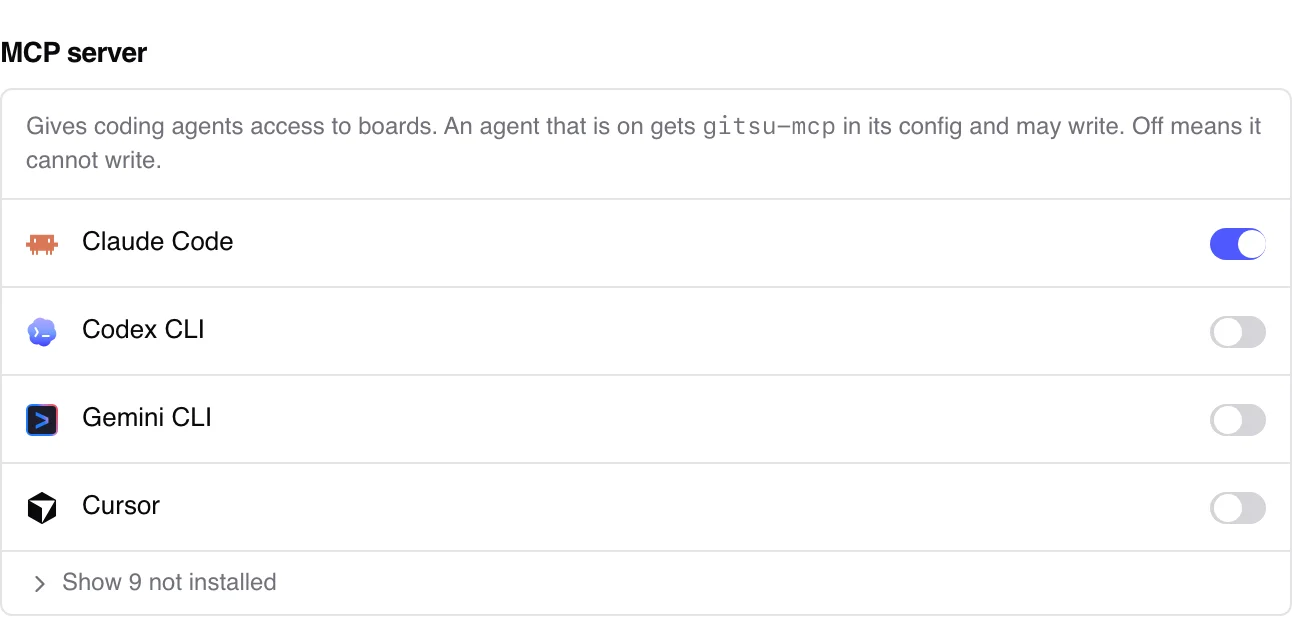
Gitsu controls writes made through its own MCP tools. Its write switch is on by default. Turning Agents can write to your boards off in Settings → MCP server refuses subsequent Gitsu MCP writes, while reads keep working. This does not disable gh, another server or another credential available to the agent, and does not undo a write already accepted. On the Gitsu MCP path:
- The tool set is small. Nine write tools: set a field, add or remove labels, comment, close, reopen, create an issue, and start or finish work. There are no tools to delete issues, remove items from a project, or change assignees and milestones. Gitsu's rule is that an agent may only make changes GitHub keeps a record of, so each one can be seen and undone.
- Only Gitsu's own server gets in. The app reads the executable path of whatever connects to it and refuses anything that is not the
gitsu-mcpbinary it ships. - Replies are confirmed. A write reports success only after GitHub accepts it, and a write that GitHub refuses comes back with the board's valid field names and values.
- The app must be open. Writes go through the running desktop app. If it is closed, the write fails and nothing is queued.
What does Gitsu not protect against?
Gitsu cannot prove which agent is calling. It can prove that the caller is its own MCP server, but the agent's name is a claim, so the name on a write is self-reported rather than verified. Gitsu does not count or cap how many writes an agent makes. And writes still land as you, with no bot identity, exactly as they do with gh.
Gitsu's MCP server and agent panel are part of the desktop app, which requires a paid Seat through Pro or Team. The free web app does not include them; see the pricing page for the current plans.
Which version should you use?
Use plain GitHub if you want no extra app, work across many repositories, or need the agent to manage projects, assignees or milestones. Use Gitsu if you want to watch the board while the agent works and want a hard ceiling on what it can change. The reasoning behind that ceiling is in how Gitsu lets an AI agent update GitHub issues safely. To start, install Gitsu, launch it once so it connects to Claude Code, and ask Claude to pick up an issue by number: it marks the issue with start_work and moves its Status with set_field_value, and you watch the card change on the board. If your board lives in Linear today, moving from Linear to GitHub Issues covers getting the issues across first.
How we checked
The local relay controls on Gitsu MCP writes, including the write switch, nine write tools, default attribution and the other GitHub access paths those controls cannot restrict.
Frequently asked questions
Can Claude Code work on GitHub issues?
Yes. In the terminal it reads, comments on and closes issues through gh or an MCP server. On GitHub, the Claude Code GitHub Action responds when someone mentions @claude in an issue comment or a new issue, and can turn the issue into a pull request.
Can Claude Code update the Status field on my GitHub Projects board?
Yes, with a Projects-capable tool: gh project item-edit, the projects toolset of GitHub's MCP server, or set_field_value in Gitsu's MCP server. Plain gh issue commands cannot, because Status is a project field, not an issue property.
How do I stop an agent from making changes I did not ask for?
Limit every integration and credential available to the agent. Use read-only tools for planning and retain host approvals. Gitsu MCP has no delete tool, and its desktop switch refuses subsequent Gitsu MCP writes. That switch does not stop gh, another server or writes already accepted.
Will other people see that an agent is working on an issue?
With Gitsu, only if the agent calls start_work, which puts a real agent-working label on the issue until finish_work removes it. A run in Gitsu's agent panel does not label anything on its own.
Does the agent's comment show up as written by a bot?
Gitsu MCP writes with your GitHub identity. By default it adds a hidden marker to agent comments, and Gitsu reads that mark as a self-reported name in activity. The MCP tools cannot turn the mark off. Other tools may use different credentials or attribution.
Try it on your own boardsGitsu opens your GitHub Projects boards in the browser. Sign in with GitHub and work on the same issues your team already uses.
Open the web app