Gitsu lets a coding agent change your GitHub issues only inside limits the desktop app enforces: you switch the agent on, the agent asks for a write budget, every write goes through the running app, and the app refuses anything outside the budget or the nine write tools. Agent safety is part of Gitsu Pro and exists only in the Gitsu desktop app; the Web App has no agent writes.
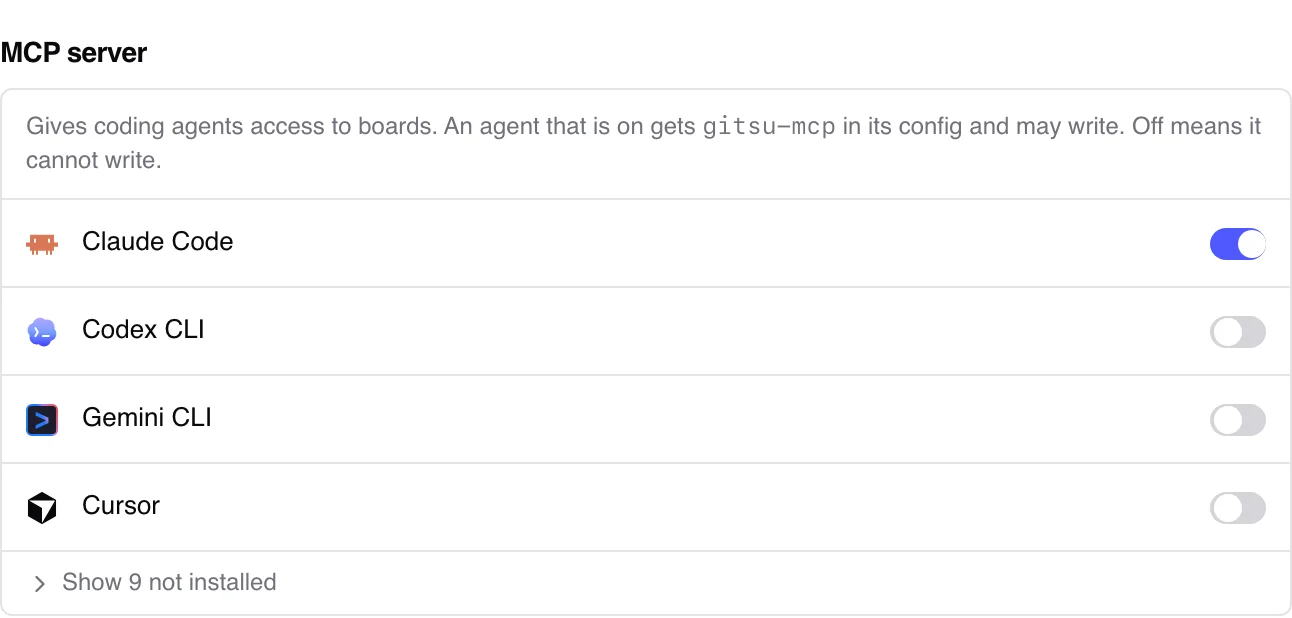
How do I give an agent write access?
Switch it on in Settings, MCP server. That switch is the grant, and turning it off is the revocation. Gitsu writes gitsu-mcp into the agent's own MCP configuration when you switch it on and removes it when you switch it off. The settings text says it directly: an agent that is on may write, and off means it cannot write.
The app reads the list of enabled agents on every write. An empty list refuses every write, so a fresh install lets no agent change anything until you choose one.
What stops an agent from writing more than it should?
Four checks, all in the desktop app rather than in the agent:
- Only Gitsu's own MCP server may connect. When a process dials the app's local socket, the app reads the process's executable path from the operating system and refuses anything that is not the bundled
gitsu-mcpbinary. - Writes need a budget. The agent calls
request_write_budgetwith a reason and a number of units. Each write then spends one unit, and a write with no budget is refused with an error namingrequest_write_budget. Onlystart_workandfinish_workare free. - The budget belongs to one process. It is tied to the agent process that asked for it, not to a name. It ends when that process exits, and in any case after one hour. A second process that claims the same agent name gets nothing.
- Nothing on the write list destroys data. The nine tools set a column, comment, add or remove labels, close, reopen, and mark work started or finished. GitHub records the previous state of each of these, so a person can see and undo it. There is no delete tool, no tool that removes an item from a board, and no draft edit. The full list is on the MCP server page.
Each write answers only after GitHub accepts or refuses it. If the app quits mid-write, the agent is told the result is unknown and to re-read before trying again.
How do I see what an agent changed?
Gitsu writes as you, with your GitHub account, because it has no bot identity. So it marks agent work in three ways:
- A mark on every agent comment. Gitsu appends an HTML comment naming the agent and the date to each comment an agent posts. GitHub hides HTML comments in the rendered page, so the mark shows in the raw body. It is on by default, and the agent has no way to turn it off; the setting lives only inside the app.
- A status in the header. While a write is in flight, the top of the board shows "Claude Code is writing to this board", or the name of whichever agent is writing.
- The agent-working label. An agent can call
start_workto put theagent-workinglabel on an issue, which the board animates, andfinish_workto remove it. If the agent process dies first, Gitsu removes the label itself.
A run started from the agent panel writes nothing to GitHub on its own. Only the agent's own start_work call puts a label anywhere.
What does Gitsu not protect against?
These limits are recorded in Gitsu's design decisions, and they matter if you are deciding how far to trust an agent:
- The agent names are not proof. The app can prove the caller is the Gitsu MCP binary. It cannot prove which agent launched that binary, because the agent's name is claimed, not verified. The per-agent switches work for honest agents; they do not stop a hostile program on your Mac that pretends to be one.
- There is no per-grant cap. The budget grants whatever number of units the agent asks for. What bounds it is the one-hour limit, the process tie, and the non-destructive tool list.
- There is no per-request confirmation. Gitsu removed the grant dialog because people could not tell what it was asking and it timed out before they answered. Stopping an agent mid-run means opening Settings.
- The comment mark is not in the timeline yet. You find it by reading the raw comment body.
How does this compare with other trackers' MCP servers?
In Gitsu's own market research, checked on 2026-08-22, Linear's MCP server gives an agent write access through an API key with no approval step, no spend limit, and no mark on what the agent wrote. That research covers Linear only, not every tracker.
Linear's server has advantages Gitsu's lacks: it needs no desktop app, and it works from any machine that can reach Linear. Gitsu's limits depend on a process running on your Mac, which is also why they exist only on macOS and only in the desktop app.
Who is this for?
Developers and small teams who want a coding agent to update the board as it works, and who keep their work in GitHub Issues. Nobody else on the team has to install anything: the agent's changes appear on GitHub like any other edit. The getting started guide covers signing in and choosing boards.
Frequently asked questions
How do I stop an agent from writing to my board?
Switch it off in Settings, MCP server, in the Gitsu desktop app. Gitsu removes gitsu-mcp from that agent's configuration, and the app refuses its next write because it checks the list of enabled agents on every call.
Does Gitsu ask me to approve each agent write?
No. Switching an agent on is the approval. Gitsu used to show a grant dialog for each budget request and removed it; ADR 0019 records why. What bounds the agent now is the budget's one-hour limit, its tie to one agent process, and a write tool list with nothing destructive on it.
Can an agent delete an issue or remove it from a project?
No. The nine write tools can set a column, comment, add or remove labels, close, reopen, and add or remove the agent-working label. None deletes an issue, removes a project item or edits a draft.
How can I tell which comments an agent wrote?
Each comment an agent posts through Gitsu ends with an HTML comment naming the agent and the date. GitHub hides HTML comments when it renders the page, so you see the mark in the raw body or the edit view. Gitsu does not show it in the issue timeline yet.
Does this work in the Gitsu Web App?
No. Agent writes go through a local socket to the desktop app, so they need the macOS app running. The Web App has no MCP server and no agent writes.
Try it on your own boardsGitsu opens your GitHub Projects boards in the browser. Sign in with GitHub; your data stays in GitHub.
Open the Web App