Trello and GitHub Projects both give you a board of cards, so for a software team the question is what the card is. In GitHub Projects the card is the GitHub issue or pull request, so moving it changes the issue. In Trello the card is a Trello card, and GitHub work is attached to it.
We make Gitsu, a client for GitHub Projects, so we have a side. This page says where Trello wins, what its GitHub Power-Up actually does, and when a faster board over GitHub is the better fix.
How do GitHub Projects and Trello compare for software development?
GitHub Projects is built from GitHub issues and pull requests; Trello is a general board tool that links to GitHub through a Power-Up. GitHub's docs say a project's integration with issues "works both ways": change an assignee or drag an item to another group in the project, and the issue changes. Trello cards keep their own lists, members, labels and due dates.
| What you compare | GitHub Projects | Trello |
|---|---|---|
| What a card is | A GitHub issue, pull request or draft issue | A Trello card, with GitHub items attached |
| Layouts | Table, board, roadmap | Board on every plan; Calendar, Timeline, Table, Dashboard and Map on Premium |
| Automation | Built-in workflows, Actions and the API | Rules, card and board buttons; 250 runs a month on Free |
| Fields | Custom fields, iterations, sub-issues | Labels, due dates, Custom Fields, checklists |
| Free plan | Included on GitHub Free | 10 collaborators and 10 boards per Workspace |
| Paid entry | Team: $4 per user per month for 12 months | Standard: $5 per user per month billed annually |
| Who can join | Anyone with a GitHub account and access | Anyone, no GitHub account needed |
Sources: GitHub's About Projects docs and pricing page; Trello's pricing page and automation page. All checked on 12 October 2026.
What does Trello do better than GitHub Projects?
Trello is easier for people who are not engineers. Anyone can join a board without a GitHub account or a repository, and a card can hold anything: a design review, a launch checklist, a hiring step. If marketing, support and engineering share one board, Trello fits them all, where GitHub Projects asks everyone to work in GitHub.
Its automation is approachable. You set a trigger and the actions that follow, or add card and board buttons that run a series of steps in one click. Trello's own examples include a "Done!" button that moves a card to the Done list and marks its date complete, and a board button that sorts cards by story points and due date. GitHub Projects' built-in workflows are narrower, and anything beyond them means writing a GitHub Actions workflow or calling the API.
Trello also has more extras out of the box: card mirroring across boards, templates from the community, mobile and desktop apps, and Power-Ups for Slack, Google Drive and over 200 other tools.
How much does Trello cost, and what are the free plan's limits?
Trello's Free plan allows up to 10 collaborators and 10 boards per Workspace, with 250 automation command runs a month. These figures come from Trello's pricing page, checked on 12 October 2026:
| Plan | Price | What it adds |
|---|---|---|
| Free | $0 | 10 collaborators and 10 boards per Workspace, 250 command runs |
| Standard | $5 per user per month billed annually ($6 monthly) | Unlimited boards, 1,000 command runs, single-board guests |
| Premium | $10 per user per month billed annually ($12.50 monthly) | Calendar, Timeline, Table, Dashboard and Map views; unlimited command runs |
| Enterprise | $17.50 per user per month billed annually | Organization-visible boards, Power-Up administration, SSO through Atlassian Guard |
GitHub Projects has no separate price. GitHub's pricing page lists Issues and Projects on the Free plan, and Team at $4 per user per month for the first 12 months. A team that keeps code in GitHub and plans in Trello pays for both once it outgrows Trello's free limits.
What does the Trello GitHub Power-Up do with commits, pull requests and issues?
It attaches them to cards. Once you enable the GitHub Power-Up on a board and authorize your GitHub account, you can attach a pull request, issue or commit to a card. Atlassian's Power-Up documentation says an attached pull request shows its name, whether it passed checks, its labels, who opened it, whether it merged, the assignee and the comment count.
What it does not do is keep the two in step. The same documentation says the only time the Power-Up writes to GitHub is when you attach an item, when it leaves a comment linking back to the card, and that this comment can be turned off. Moving a card to "Done" does not close the issue, and closing the issue does not move the card. Someone on the team keeps them in agreement by hand, or the board drifts.
For a team whose work is mostly code, that drift is the real cost of Trello. The board looks simple because it holds a copy of the plan, while the issues, reviews and merges happen somewhere else.
When should you keep GitHub and use Gitsu instead?
Choose Gitsu if your work is GitHub issues and you looked at Trello because GitHub's board felt slow or clumsy. Gitsu reads and writes your GitHub project directly. Drag a card to a new column and it writes the project's Status field, so the issue and the board never disagree. It also gives those issues:
- a board and dense lists, with keyboard shortcuts and a
⌘Kcommand palette over every write; - nested AND/OR filters across native, built-in and custom fields, with saved views;
- bulk edits on selected items, shown at once and rolled back with a message if GitHub refuses;
- a roadmap for one project, drawn from its date or iteration fields.
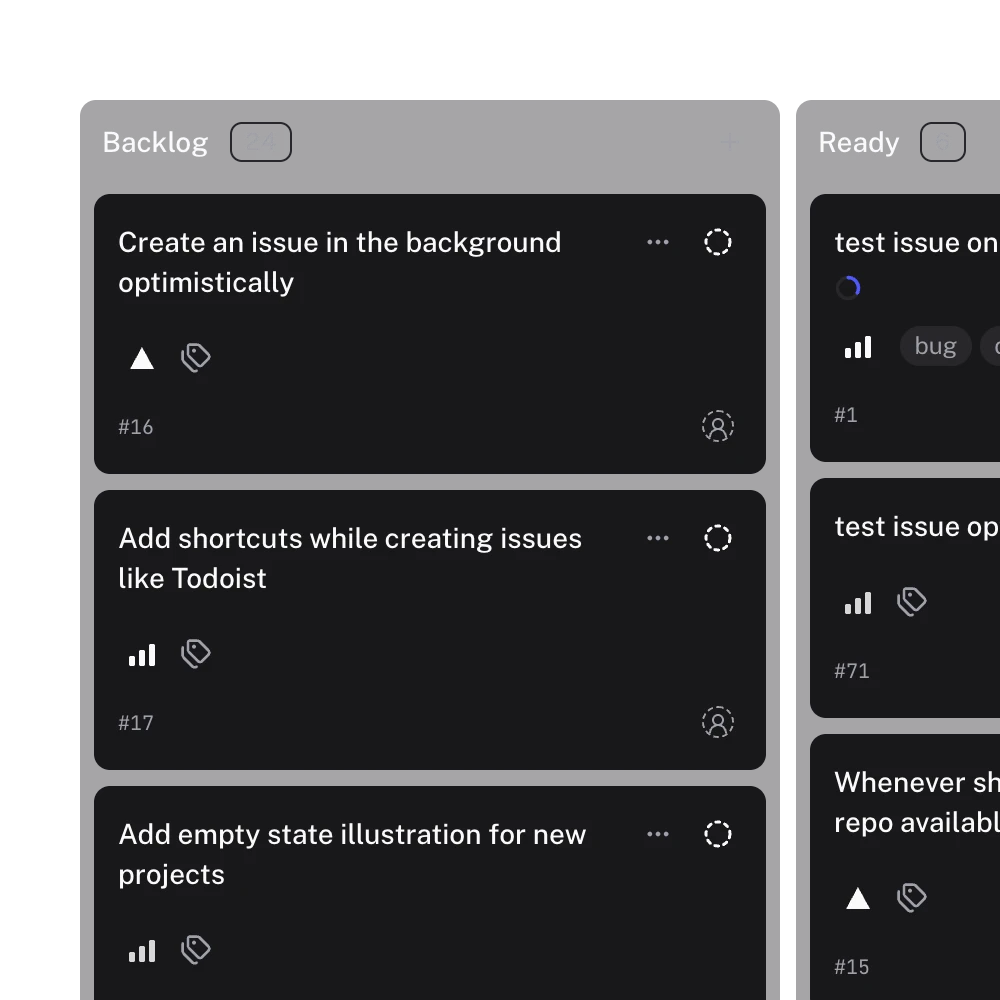
Gitsu is not a Trello replacement for a mixed team. Everyone who edits needs a GitHub account with access to the project. It has no Trello importer, no rule builder or card buttons, and its product requirements list notifications, mobile apps, multi-project workspaces and cross-project views as non-goals. One project is active at a time, and it loads up to 2,000 items per project.
| Your situation | Pick |
|---|---|
| Non-engineers share the board, or the work is not code | Trello |
| Work is issues and pull requests, and GitHub's board is fine | GitHub Projects |
| Work is issues and pull requests, and GitHub's board is the problem | Gitsu over GitHub Projects |
| You need sprint capacity planning inside Azure DevOps | Azure Boards |
Open Gitsu's free web app on one GitHub project and drag a few cards across the board; teammates on github.com see the same changes. Paid Seats add the macOS app and coding agents; see current plans. For the wider field, read the roundup of GitHub Projects tools.
How we checked
What Atlassian's own documentation says the Trello GitHub Power-Up writes back to GitHub (one comment, optional), set against Gitsu's requirements for writing board moves straight to the GitHub project and its own limits, with headings taken from the searches assistants ran for this comparison in October 2026.
- https://trello.com/pricing
- https://trello.com/butler-automation
- https://support.atlassian.com/trello/docs/using-the-github-power-up/
- https://docs.github.com/en/issues/planning-and-tracking-with-projects/learning-about-projects/about-projects
- https://docs.github.com/en/issues/planning-and-tracking-with-projects/managing-items-in-your-project/adding-items-to-your-project
- https://github.com/pricing
Frequently asked questions
Is Trello good for software development?
Trello works for small teams that want a simple board, and Atlassian markets it to engineering teams. Its limit for software work is that a card is not an issue: the GitHub Power-Up attaches pull requests, issues and commits to a card and shows their status, but moving the card does not change the issue. GitHub Projects plans the issue itself.
What are the Trello free plan limits?
Trello's pricing page, checked on 12 October 2026, lists the Free plan at up to 10 collaborators per Workspace, up to 10 boards per Workspace, unlimited Power-Ups per board and 250 Workspace automation command runs per month. Standard removes the board limit and raises command runs to 1,000 a month.
Does the Trello GitHub Power-Up sync issues?
No. Atlassian's documentation says the Power-Up attaches pull requests, issues and commits to Trello cards and shows details such as checks, labels, assignee and merge state. The only thing it writes back to GitHub is a comment linking to the card, and you can turn that off.
What can Trello board automation do?
Trello's automation is built into every board: rules that run actions when a trigger fires, and card or board buttons that run a series of actions in one click, such as moving a card to Done and marking its due date complete. Each run counts against a monthly allowance: 250 Workspace command runs on Free, 1,000 on Standard, unlimited on Premium.
Is GitHub Projects free?
Yes. GitHub's pricing page lists Issues and Projects on the Free plan, which also includes unlimited public and private repositories. A project can hold up to 50,000 items, counting archived ones.
Try it on your own boardsGitsu opens your GitHub Projects boards in the browser. Sign in with GitHub and work on the same issues your team already uses.
Open the web app