GitHub Projects provides table, board and roadmap views over GitHub issues and pull requests. Gitsu is a client for developers and small teams who want another interface for that daily backlog work. It brings dense lists, keyboard controls, nested filters and bulk edits to the same issues your team already uses. Start with the free web app; paid macOS Seats add desktop coding agents and MCP access.
GitHub remains the system of record. Gitsu caches board responses locally, and its Web App uses a server proxy. The data-handling page explains these paths and AI processing. You can adopt Gitsu for daily board work and keep github.com for administration, without moving the team to a second tracker.
What does Gitsu add over GitHub's UI?
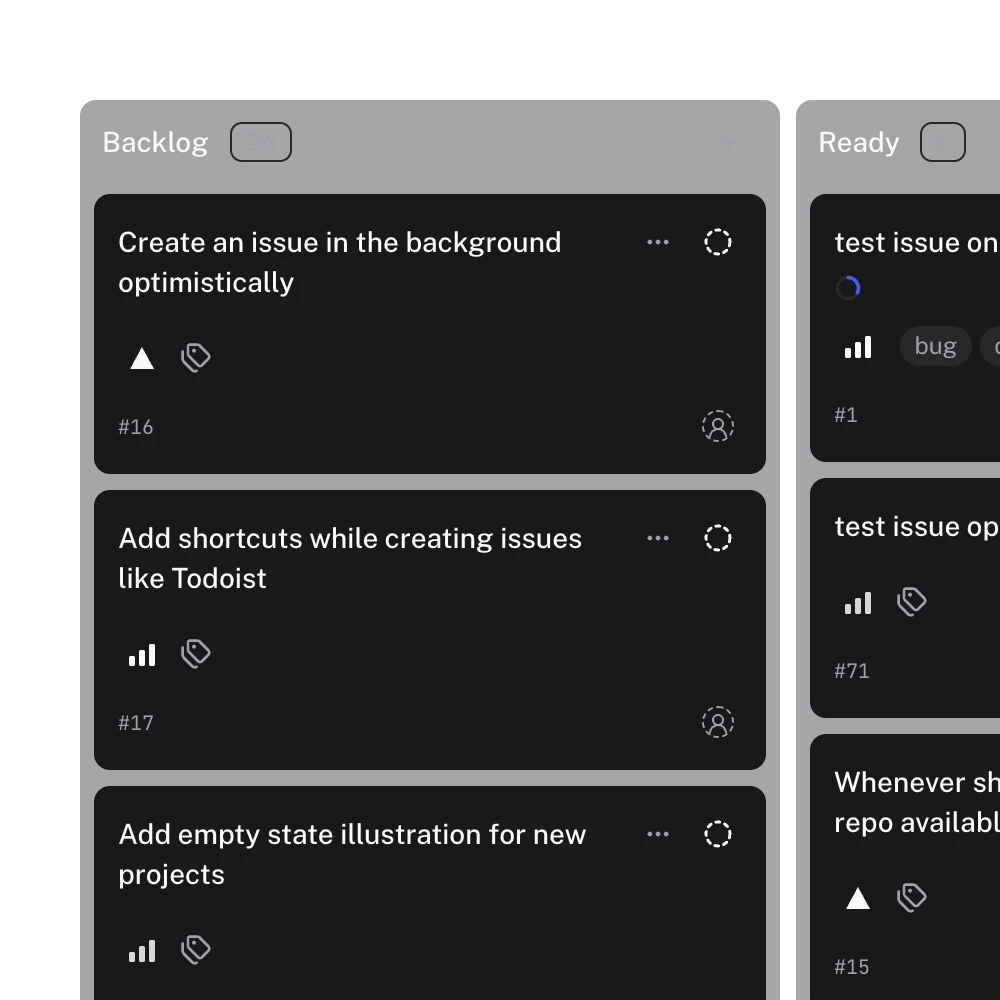
Gitsu gives daily GitHub board work a dedicated interaction model: dense lists, a fixed keymap, nested filters and bulk edits.
| Daily task | Why choose Gitsu | Where github.com still fits |
|---|---|---|
| Triage a backlog | Dense lists, field grouping and locally evaluated nested AND/OR filters | Work on the same underlying GitHub issues |
| Update many issues | Select items and bulk-edit fields; the screen updates before the request finishes | Review the resulting issue and project records |
| Plan dated work | A single-project roadmap with date or iteration fields | Configure the project's fields and GitHub's own saved views |
| Work from the keyboard | Command palette and a fixed keymap for list, board and roadmap | Administration and platform work outside the client |
| Connect coding agents | Paid desktop MCP access with a switch for subsequent Gitsu MCP writes | Other integrations keep their own tools and permissions |
- A desktop app. Gitsu runs as a macOS app as well as in the browser. The Gitsu desktop app page covers installing it, updates and what it keeps on your Mac.
- One keymap for everything.
⌘Kopens the command palette.Ccreates an issue,Fopens the filter menu,G L,G BandG Rswitch between list, board and roadmap, and?lists shortcuts. - Nested filters. One filter can combine AND and OR groups across native issue fields, Projects built-in fields and custom fields, such as "no milestone OR no estimate". GitHub's documented Projects filter bar supports OR within one field, but not across different fields.
- Bulk edit and writes that land at once. Select many items and change status, priority, assignees or labels together. Every write updates the screen straight away and rolls back with a message if GitHub refuses it.
- A controlled path for coding agents. The desktop app bundles an MCP server. Agents can read the board, and their Gitsu MCP writes go through the running app before reaching GitHub.
Who should use Gitsu, and who should stay on GitHub's UI?
Use Gitsu if you regularly triage a backlog, edit many items at once or switch between list, board and roadmap from the keyboard. The free web app lets you evaluate those workflows on an existing project. Add the paid macOS app if you want coding agents connected through Gitsu MCP.
Use GitHub's UI for a project over Gitsu's 2,000-item loading cap, for administration the client does not cover, or when occasional board checks already meet your needs. You can use both interfaces on the same project; choosing Gitsu for daily work does not give up access to GitHub's other capabilities.
Can I use both?
Yes. Gitsu edits the same GitHub records your team sees on github.com. Local caches help display them; they do not create a second tracker to migrate back from. Every item has an Open on GitHub control, so you can continue work there when Gitsu does not cover a task.
That also means only you need Gitsu. You can pay for yourself with Pro, or a Team can buy Seats for just the people who want it; nobody else on the team has to change anything. The web app is free, and the paid subscription adds the Gitsu desktop app for macOS and the agent features.
For how Gitsu compares with the paid planning tools, read Gitsu compared with Zenhub or the roundup of GitHub Projects tools. To set it up, follow getting started with the Gitsu Web App.
What does GitHub's own Projects UI do better than Gitsu?
GitHub's own UI covers project administration and GitHub-specific settings that Gitsu leaves to the platform. Use it for project workflows, README settings and configuration of GitHub's saved views; Gitsu keeps its own saved views instead. Pull request review and GitHub Actions also remain on GitHub. Check the size of your board: Gitsu loads up to 2,000 items per project, so a larger project will be incomplete in the client. GitHub's UI is available with your GitHub account, and Gitsu's web app is also free. Gitsu's paid desktop features are an additional choice. For a developer who spends the day filtering and editing issues, breadth of administration is only one part of the decision; the daily interaction model matters too.
What does Gitsu not do yet?
Gitsu does not have cycles with rollover or a triage inbox. It shows one project at a time, and cross-project views, notifications and a mobile app are non-goals in its product requirements. It does not do pull request review or GitHub Actions. The agent surface runs only in the desktop app, not on the web.
The cap is the one to check first. Gitsu loads up to 2,000 items per project. Past that it stops and says so, with a message such as "Showing 2000 of 2100 items", and the rest are not on the board. This is a deliberate limit in Gitsu's requirements (FR-024), and it is a real problem for large open-source projects.
How do I change the interface without duplicating issue tracking?
Open the existing GitHub Project in Gitsu and continue editing its existing issues, rather than copying them into a new tracker. GitHub's own Projects UI already connects a project to its issues and pull requests. Gitsu keeps that relationship and supplies another interface for day-to-day work.
A small-team discussion describes a homemade tracker accumulating stale decisions before the team moved the issue lifecycle into GitHub. That is a useful adoption question: can the interface change without creating two competing versions of the task? It is one reported experience, not a verdict on GitHub Projects or proof that Gitsu fixes stale decisions automatically.
Try a narrow evaluation on work you already intended to update:
- Open a familiar issue on github.com and note its repository, number and current status.
- Sign into Gitsu and import the existing GitHub Project containing that issue.
- Find the same issue in Gitsu. Check the repository and number, especially if your project spans repositories.
- Make one intended change, such as assigning the issue or updating its status. If GitHub refuses it, inspect the message and the restored value.
- Open the issue on GitHub and confirm the resulting record. Keep GitHub available for administration and operations outside Gitsu's scope.
This is an evaluation procedure, not a report that every authenticated UI flow was tested for this article. It gives you a concrete way to judge the client against your project's permissions and fields. A feature list cannot establish whether a particular repository will let your account make a change.
The distinction also matters for documentation. If an issue contains an outdated decision, changing clients will not rewrite that decision. Keep the issue description current and use a linked document when the design needs more explanation. Gitsu's supported editing operations should not be mistaken for automatic specification versioning.
How do I switch between the projects I already use?
Choose a project from Gitsu's top-bar Project Switcher, which lists the projects in your Working Set. Add projects lets you change that selection. The Working Set is an ordered list of project memberships for the signed-in identity; changing it changes which boards Gitsu offers, without creating or deleting the GitHub projects.
That is navigation across projects, not a combined portfolio. The selected board still belongs to one project, and the 2,000-item loading cap still applies. If your task requires seeing every issue across several boards in a single result, this switcher does not provide that result.
Which interface should I try next?
Keep GitHub's own UI if its saved views and project administration already cover your routine. Open an existing project in the free Gitsu Web App if you want to try nested filters, bulk editing and keyboard navigation on the same records. Choose the paid macOS app when you also want Gitsu's desktop agent workflow; check pricing before buying a Seat.
How we checked
A source-checked workflow for using Gitsu as a second interface to existing GitHub records, including its project switcher, optimistic edits and 2,000-item cap.
- https://www.reddit.com/r/agile/comments/1vs1moe/as_a_small_team_i_just_think_small_teams_dont/
- https://docs.github.com/en/issues/planning-and-tracking-with-projects/learning-about-projects/about-projects
- https://docs.github.com/en/issues/planning-and-tracking-with-projects/customizing-views-in-your-project/filtering-projects
- https://github.com/pricing
Frequently asked questions
Is there a GitHub Projects client other than github.com?
Gitsu gives GitHub Projects dense lists, keyboard controls, nested filters and bulk edits in a free web app and a paid macOS app. It reads and writes your existing GitHub boards, so teammates can keep using github.com. Paid desktop Seats also include agents and MCP access.
Does Gitsu replace github.com?
No. Gitsu is a client for GitHub Issues and Projects. Every item has an Open on GitHub control so you can use GitHub for work the client does not cover.
How many items can Gitsu load from one project?
Up to 2,000. Past that, Gitsu stops loading and tells you, for example "Showing 2000 of 2100 items".
Does Gitsu have GitHub's Roadmap view?
Yes, as a layout of its own. Each item is a bar drawn from a start and a target date or iteration field, and on date fields you drag a bar to reschedule the item. Gitsu does not copy the Roadmap views you set up on github.com.
Try it on your own boardsGitsu opens your GitHub Projects boards in the browser. Sign in with GitHub and work on the same issues your team already uses.
Open the web app