gitsu-mcp is the MCP server that ships inside the Gitsu desktop app. Any MCP client, such as Claude Code, Codex or Gemini, can use it to read a GitHub Projects v2 board and, while Gitsu is open, to change it. It is a Pro feature and runs only in the Gitsu desktop app for macOS. The Web App has no MCP server.
What tools does gitsu-mcp register?
It registers twelve tools. The list below is taken from the registration code in src-tauri/mcp/src/server.rs and the WRITE_TOOLS table in src-tauri/mcp/src/write.rs, and a test fails the build if the count changes.
Three tools are answered by the server itself:
| Tool | What it does |
|---|---|
list_items | Reads the items on a board (issues, pull requests and drafts) with assignees, labels, milestone and the board's own columns. Filter on any column with fields, for example {"Priority": "P0"}. |
list_fields | Reads the board's columns, each column's type and, for select columns, the values it accepts. |
surface_info | Checks that the Gitsu app is running and reports its version and the caller name it saw. Reads and writes no board data. |
Nine tools are forwarded to the running Gitsu app, which performs the write:
| Tool | What it writes | Budget |
|---|---|---|
request_write_budget | Nothing. Asks Gitsu for write units, with a reason. | none |
set_field_value | One project column on one item: Status, Priority, Estimate or any column the board declares. | 1 unit |
add_comment | One comment on the issue behind an item, with a hidden provenance mark. | 1 unit |
add_labels | Labels added from the repository's existing labels. Labels not named are left alone. | 1 unit |
remove_labels | Labels removed. Labels not named are left alone. | 1 unit |
close_item | Closes the issue, as completed or as not planned. | 1 unit |
reopen_item | Reopens a closed issue. | 1 unit |
start_work | Adds the agent-working label, which the board animates. | free |
finish_work | Removes the agent-working label. | free |
There is no tool that creates an issue, assigns a person, sets a milestone, deletes anything or removes an item from a board.
How do I turn it on?
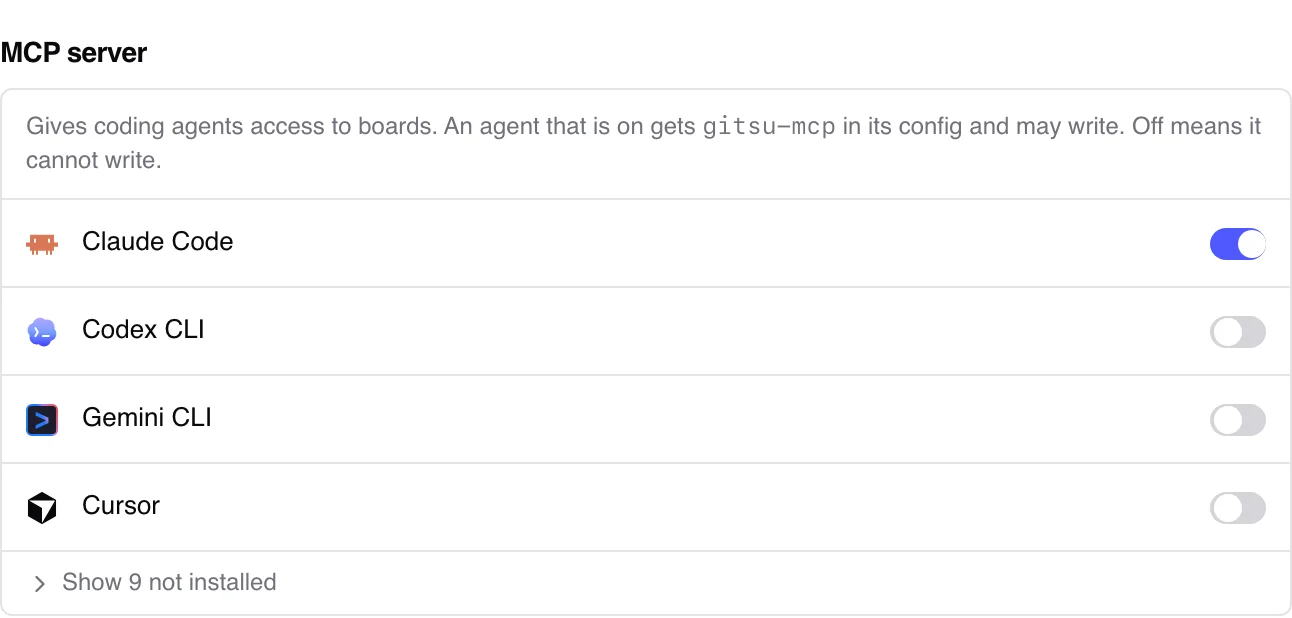
Open Settings in the Gitsu desktop app and go to the MCP server section. It lists the coding agents installed on your Mac, with the ones that are not installed behind a Show not installed link. Switch an agent on and Gitsu adds gitsu-mcp to that agent's MCP configuration; switch it off and Gitsu removes it. In Gitsu's own words: "An agent that is on gets gitsu-mcp in its config and may write. Off means it cannot write."
You can also register the binary with an MCP client by hand, as the developer guide shows for Claude Code: claude mcp add gitsu -- /abs/path/to/gitsu-mcp --stdio. Writes still need the agent switched on in Settings, because the app refuses writes while no agent is enabled.
How does it find my board?
It uses the folder your agent is working in. The server reads the folder's git remote, finds the repository on GitHub, and uses the Projects board linked to that repository. If the repository has several boards, it lists them with their ids and asks the agent to choose. Every answer starts with the board it read and says when the board was discovered rather than named, so a wrong guess is visible. Pass project_id to name a board directly, which is the only way to reach a board that no repository links to.
What does it refuse to do?
- Write without the app. The server never writes to GitHub itself. Each write goes over a local socket to the running Gitsu app, which is the only place writes are checked and performed. With the app closed, the agent gets an error telling it to start Gitsu, and nothing is queued.
- Report success early. A write answers only after GitHub accepts or refuses it. If the app quits mid-call, the answer says the result is unknown and tells the agent to re-read before retrying.
- Accept guessed column values. A column or value the board does not have is refused, and the refusal lists the ones it does have.
- Use a second sign-in. The server reads the GitHub token the desktop app stored in the macOS keychain. Signing out of Gitsu cuts it off too.
How writes are limited and marked is covered on agent safety.
Who is it for?
It suits developers who already run a coding agent in a repository and keep the work in GitHub Projects. The agent can read the P0 items on the board, pick one, mark it as being worked on, and close it with a comment when it is done, while you watch the board update in the Gitsu window.
If you only want to browse and edit boards, the free Web App covers that without an install. The getting started guide walks through signing in and importing boards.
Frequently asked questions
Which tools does the Gitsu MCP server register?
Twelve. Three it answers itself: list_items, list_fields and surface_info. Nine it forwards to the running Gitsu app: request_write_budget, set_field_value, add_comment, add_labels, remove_labels, close_item, reopen_item, start_work and finish_work.
Can an agent delete issues or project items through it?
No. The write list is closed at nine tools, and none of them deletes an issue, removes an item from a board or edits a draft. The list length is pinned by a test, so adding a tool fails the build until someone reviews it.
Does the MCP server work with the Gitsu app closed?
Reads do: list_items and list_fields read GitHub directly with the token the app stored in your keychain. Writes do not. With the app closed a write is refused with an error telling the agent to start Gitsu, and nothing is queued for later.
Is there an MCP server for the Gitsu Web App?
No. The MCP server is a desktop binary that reads the sign-in token from the macOS keychain, and the Web App keeps its token on the server. In the Web App, Settings says the MCP server runs in the desktop app and is part of Pro.
How does it know which board to read?
It takes the folder your agent is working in, reads that repository's git remote, and uses the GitHub Projects board linked to the repository. Every answer names the board it read. Pass project_id to choose a different board.
Try it on your own boardsGitsu opens your GitHub Projects boards in the browser. Sign in with GitHub; your data stays in GitHub.
Open the Web App