Gitsu's GitHub Projects MCP server can return a normal text answer and an inline card for the same result. The card keeps board context in the chat: item state, fields, labels, links and the result of a write are visible without making you reconstruct the answer from prose.
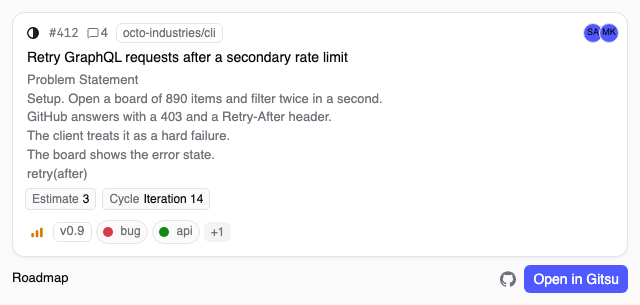
What does a GitHub Projects MCP answer look like in Gitsu?
A Gitsu MCP answer can include a view beside the text response when the host supports MCP Apps. The sidecar serves five view families: one item, a list of items, a list of boards, a board's columns, and the result of a write tool.
The item view uses Gitsu's board card and shows the issue or pull request number and title, state, Status and Priority values, labels, assignees, sub-issue progress, blockers and the first six lines of the body. The footer carries the board name and links to the item on GitHub or in Gitsu. The list view can show flat rows, groups by a board column or counts for a filter. The projects view uses the same project-switcher row as the app. The fields view lists each column, its type and its available values, then separates labels because labels are not a board column.
The write view is one shared build served for each of the nine write tools. It draws the item after the tool result, marks the field or label that changed, shows a comment when the tool added one, and prints the result message. A failed write keeps the unchanged card and displays the refusal.
Which MCP hosts render Gitsu cards?
MCP Apps hosts render the cards; other MCP clients receive the text answer. Gitsu's sidecar checks the client's initialize capabilities for io.modelcontextprotocol/ui. When that extension is present, the relevant tool gets a ui://gitsu/... resource URI. Without it, the server leaves the normal text-only response in place.
Claude Desktop and VS Code are named examples of hosts that render MCP Apps in Gitsu's sidecar documentation. The sidecar selects the view path from the capability flag, not from the host's product name.
Gitsu also maps the host's theme variables into the view's tokens. A dark host can send a dark context, and the card switches its color scheme and uses the host's surface, text and border values where the MCP Apps contract provides them.
What can I do from a Gitsu card?
Read cards open the item in Gitsu or on GitHub; they do not edit the board. The card sends no board write call. Its Open in Gitsu button sends a gitsu:// link through the app-only open_in_gitsu tool, while the GitHub action leaves navigation to the host.
The write-result view shows the result after an existing MCP write tool has run. It does not add a second editor inside the chat. Instead, it shows the item as it now stands and marks the slots changed by set_field_value, add_labels, remove_labels, close_item, reopen_item, start_work, finish_work, create_item or add_comment. If GitHub refuses the write, the view shows the card as it was and the refusal text.
The result stays compact: scan what changed in the chat, then open the item in Gitsu when you need the full board context.
How fresh is the data in a Gitsu card?
A card uses the structured answer already produced by the sidecar, so the view itself does not fetch board data. The sidecar reads from Gitsu's cache when it has the requested data and reads GitHub when the caller asks for a fresh answer or the cache cannot answer the request.
The text answer names its source and age, such as a cached answer from Gitsu or a direct answer from GitHub. A cache-backed answer is a snapshot at the time the sidecar read it. The card can show GitHub avatars, but it does not make a second board request to fill in missing fields. Ask the MCP tool for a fresh answer when the age matters.
Does Gitsu need to be running for MCP views?
Gitsu does not need to be open for sidecar reads, but writes need the desktop app running. The MCP client owns the sidecar process, and the sidecar can read the stored GitHub token and answer read tools on its own. Write tools go through the local relay to the app, which is the process that applies the change and enforces the write switch.
Open in Gitsu is also an app action. It sends the view's gitsu:// link to the running app. The separate Open on GitHub action remains available for a direct GitHub destination.
How do I try GitHub Projects MCP views?
Register the Gitsu MCP sidecar in an MCP client that supports MCP Apps, then call a read tool. The setup is:
-
Install and open the Gitsu desktop app, then sign in with GitHub. MCP access is a desktop capability.
-
Register the bundled sidecar with the client. For Claude Code, the documented command shape is:
claude mcp add gitsu -- /absolute/path/to/gitsu-mcp --stdio -
Ask for an item with
get_item, list matching rows withlist_items, inspect boards withlist_projects, or ask for available columns withlist_fields. -
If the host advertises MCP Apps, the corresponding Gitsu card appears beside the text answer. Use Open in Gitsu for the board context or Open on GitHub for the source item.
The MCP server guide explains board selection, reads, writes and the app's write boundary. The Claude Code connection guide covers the client setup path.
What does GitHub Projects MCP access cost?
GitHub Projects MCP access requires a paid Seat, either Pro or Team. Pro is a Team with one Seat; Team uses multiple Seats, and each Seat holder receives the paid desktop and agent capabilities. The pricing page is the source for the current catalog, so this page does not copy a price that could drift from the billing component.
Frequently asked questions
What are Gitsu's GitHub Projects MCP views?
They are five inline view families served by Gitsu's MCP sidecar: an item card, item lists, boards, columns and write results. A host that supports MCP Apps draws them beside the text answer.
Which hosts show Gitsu MCP cards?
Hosts that advertise the MCP Apps extension show the cards. Gitsu's documentation names Claude Desktop and VS Code as examples; other MCP clients receive the text answer.
Can I change GitHub from an MCP card?
Read cards are read-only. They can open the item in Gitsu or on GitHub. When an existing write tool changes an item, the write-result view shows the confirmed result and the changed parts.
Does Gitsu need to be open for MCP views?
Gitsu does not need to be open for sidecar reads. Writes need the desktop app running, and Open in Gitsu is an action for that app.
What plan includes GitHub Projects MCP views?
MCP access requires a paid Seat. Pro is the one-Seat product and Team provides multiple Seats; see the pricing page for the current catalog.
Try it on your own boardsGitsu opens your GitHub Projects boards in the browser. Sign in with GitHub; your data stays in GitHub.
Open the Web App