GitHub issue triage is the review of incoming reports and existing conversations to decide the next action. A maintainer response queue records which issues still need that decision, who owns it and what the conversation is waiting for.
Notifications help you discover activity. A queue should help you decide what remains to do after you have read that activity. GitHub already supports saved notifications and project views; the workflow below connects those tools with an explicit review convention, then shows how Gitsu helps work through one selected project's issues.
How do you separate notifications from a response queue?
Keep notifications as conversation discovery and record the next maintainer action on the issue's project entry.
Start in GitHub's notifications inbox. Open the conversation, read what changed, and decide whether it needs action from you. GitHub lets you save an individual notification for later and return to saved notifications using is:saved. Its notification triage documentation describes that workflow.
Saving can hold a conversation while you investigate. For ongoing team work, also record the issue's next action where another maintainer can see it. An unread notification, a read conversation and a resolved issue are different states. Avoid using one as a substitute for another in your team's process.
A proposed rule is simple: before leaving a report that needs follow-up, name the next action and its owner. If you need reproduction details, ask a specific question. If the team has enough information, decide whether to accept the work or explain why it will not proceed. The queue should show that decision, rather than how many alerts someone received.
How do you build a triage queue in GitHub Projects?
Create a project view for issues waiting on a maintainer, using Status values your team agrees to maintain.
On github.com, configure your project's Status field with values appropriate to the workflow. For example, use Needs response, Waiting on reporter, Accepted and In progress. These are suggested conventions; they are not claims about GitHub's defaults or a Gitsu triage product.
- Add the issues you intend to review to the project.
- Give each issue its current response state after reading the conversation.
- Create a project view for maintainer actions.
- Apply
is:issue is:open status:"Needs response". - Save changes to the view.
- Create a separate Waiting on reporter view when the team needs to revisit clarification requests.
GitHub's single-select fields and saved project views provide the structure. The filter reference explains field qualifiers. Add an owner for the next action, rather than treating an unassigned issue as everyone's responsibility.
If you already use Status for delivery stages, choose a separate project field for response state. Keep delivery and communication decisions distinct. A fix can be in progress while a reporter still needs an answer about a workaround.
What decision should a maintainer leave after reading an issue?
Leave a next action that another maintainer can understand without reconstructing your inbox.
Consider these illustrative cases:
| What you find | Next action to record |
|---|---|
| Report has no reproduction | Ask for the missing reproduction and mark Waiting on reporter |
| Reproduction works | State what you confirmed and decide who investigates |
| A fix already exists elsewhere | Link the relevant work and explain what the reporter should expect |
| Team declines the request | Explain the decision and close when appropriate |
| Another maintainer must decide | Assign the next action and state the question |
The table is a review aid, not a classifier. A bug report can be incomplete and still urgent. A reply that asks for details can be helpful without proving that the underlying bug is valid. Make those judgments from the conversation and the code.
For example, an illustrative issue says "Export fails after login." Before assigning implementation work, ask which browser, what export and what error appeared. Record who will inspect the answer. Moving the issue to Waiting on reporter does not start a timer, and no claim here promises that a later reply changes the field automatically.
How do you keep the response queue useful over time?
Review the queue deliberately and update the response state whenever the next action changes.
Choose a maintainer rotation or another clear owner for review. At the start, check items waiting on maintainers. Then revisit the reporter-waiting list according to the team's policy. If a reporter answered, read the reply and move the issue back into the appropriate response state. If the conversation went silent, decide whether to leave it open or close with an explanation.
Treat delivery priority as a separate decision from reply order. A low-priority feature request may deserve a quick acknowledgment; a serious bug may require investigation before anyone can offer a reliable answer. A useful queue can support both without equating newest activity with greatest importance.
Keep pull request reviews in the tools that actually provide your review queue. This guide covers issue conversations in a selected project. It does not replace GitHub's repository permissions, subscriptions or review-request workflow.
How does Gitsu help you review the selected project?
Gitsu provides quick filters and bulk updates for the issues in the project you opened, reducing repeated setup during a review session.
Open the project in the Gitsu web board and check the response-state filter. You can use the same issue records while teammates keep working on github.com.
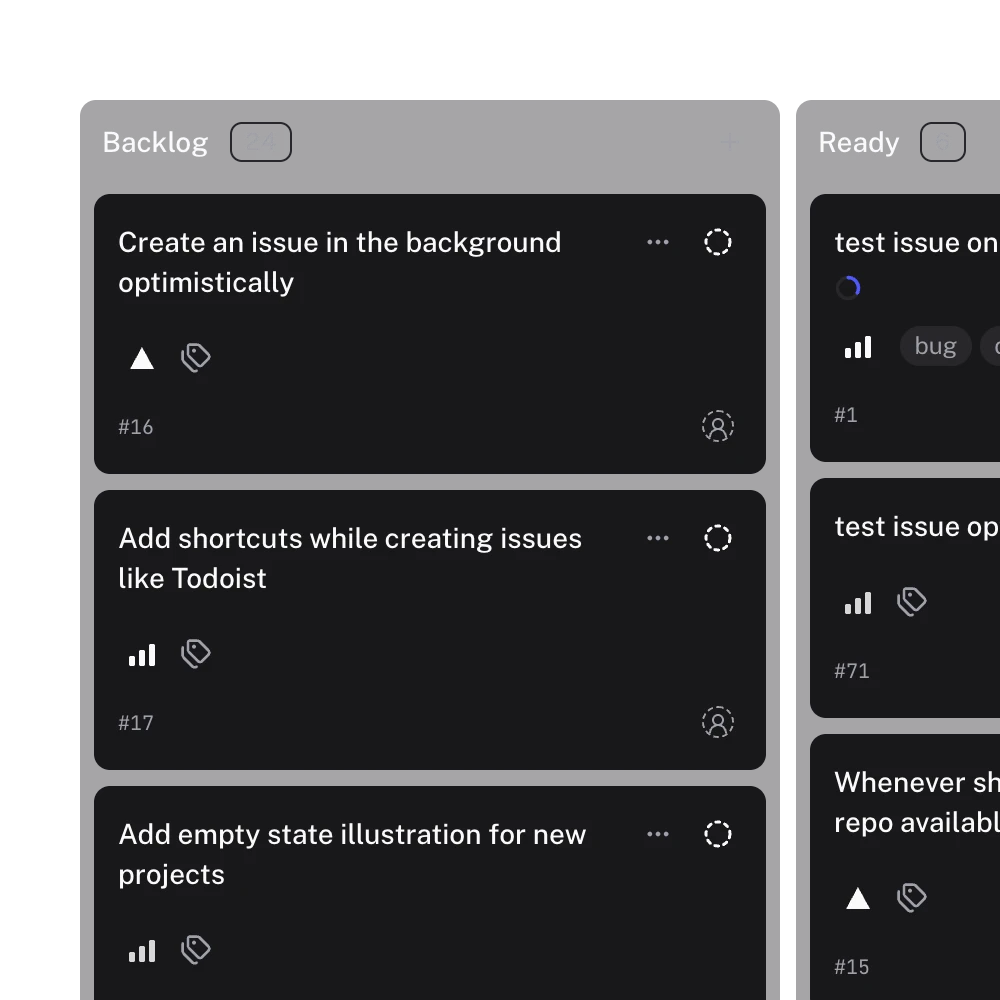
This real interface image shows Gitsu's board and list. The pictured Backlog and Ready values are not the proposed Needs response queue or evidence of an automatic triage inbox.
The quick-filter labels and behavior are defined in Gitsu's source:
| Quick filter | Actual behavior |
|---|---|
| Assigned | Open items assigned to the signed-in viewer |
| Authored | Open items created by the viewer |
| Mentioned | Open items mentioning the viewer |
| Recent activity | No filter; sort by updated time descending |
Each preset replaces both the applied filter and sort. Clicking Assigned after setting Needs response does not preserve that response-state restriction. Inspect the resulting chips and apply the intended conditions again before treating the result as your queue. Recent activity is especially easy to misread: it shows recent changes, not a judgment that a maintainer owes a reply.
After review, select issues that need the same update. Gitsu's bulk-edit mapping supports project fields, assignees, labels, milestones and issue state. Use it to record decisions you have already made, and inspect any failures. It cannot decide that a comment answered the reporter's question.
When is Gitsu enough for a maintainer response workflow?
Gitsu fits a manual issue-review routine within one project when you want focused filters and batch edits on the existing GitHub records.
Gitsu shows one project at a time and loads up to 2,000 items per project. Read loading and cap notices before assuming every relevant issue is visible. It has no notifications inbox or PR review workflow, and its quick filters do not detect unanswered comments. A global queue across arbitrary repositories needs another workflow.
The web board is free. The macOS app and MCP require a paid Seat through Pro or Team; see pricing for current terms. This routine needs neither paid agents nor automatic reminders.
Open the selected project in Gitsu, review the explicit Needs response view, and bulk-update the decisions that share an outcome. The filters and batch controls save repeated setup while the response policy and follow-up remain yours.
How we checked
A maintainer queue design checked against Gitsu quick-filter definitions and bulk-edit mapping, including the easily missed fact that a quick filter replaces both the applied filter and sort. The response-state examples are proposed manual conventions.
- https://docs.github.com/en/subscriptions-and-notifications/how-tos/viewing-and-triaging-notifications/triaging-a-single-notification
- https://docs.github.com/en/issues/planning-and-tracking-with-projects/understanding-fields/about-single-select-fields
- https://docs.github.com/en/issues/planning-and-tracking-with-projects/customizing-views-in-your-project/filtering-projects
- https://docs.github.com/en/issues/planning-and-tracking-with-projects/customizing-views-in-your-project/managing-your-views
Frequently asked questions
What is GitHub issue triage?
GitHub issue triage is the review of incoming reports and existing issue conversations to decide the next action. A maintainer checks context, asks for missing details, assigns responsibility or records why the issue will not proceed.
How do I track GitHub issues that need a response?
Use a project convention such as Needs response, Waiting on reporter and Accepted, then update it after reading the conversation. Assign a person to the next action. These are manually maintained Status values, not automatic detection of unanswered comments.
Does Gitsu find every unanswered GitHub issue?
No. Gitsu filters the selected project and loads up to 2,000 items per project. Its quick filters do not classify unanswered comments, and its scope is not every repository or notification accessible to your account.
Do Gitsu quick filters combine with my triage filter?
No. A Gitsu quick filter replaces the applied filter and sort. Assigned, Authored and Mentioned select open items related to the signed-in viewer. Recent activity clears filters and sorts by updated time, so inspect the resulting view before treating it as your response queue.
Is GitHub issue triage free in Gitsu?
The Gitsu web board is free for filtering and editing project issues. The macOS app and MCP require a paid Seat through Pro or Team. This guide does not require paid agents or promise automated reminders.
Try it on your own boardsGitsu opens your GitHub Projects boards in the browser. Sign in with GitHub and work on the same issues your team already uses.
Open the web app