A GitHub Issues backlog is a record of useful work the team has not committed to doing yet. Give deferred tasks somewhere to survive, then make an explicit decision about them when you review the backlog.
Small teams often track urgent work well and leave everything else in chat, code comments or memory. The fix starts with capture and a repeatable review. GitHub already has the issues, project fields and views to support that routine. Gitsu adds a dedicated interface for creating and updating those same records.
How do you create a GitHub Issues backlog?
Create repository issues for concrete tasks, then add them to one GitHub project with a distinct Backlog status.
Start in GitHub's own interface:
- Open the repository's Issues tab and choose New issue. Use its template when one fits.
- Write a title that names the change. Add the context needed to reconsider it later.
- Add the issue to the team's project through its Projects sidebar control.
- Configure the project's Status options to distinguish Backlog, Ready and In progress. Those are suggested names, not GitHub defaults.
- Create a project view named Backlog. Apply
is:issue is:open status:Backlog. - Save the view changes so the filter survives the current visit.
GitHub documents issue creation, adding project items, and saving views. Set up only fields your team will actually use. Priority can help distinguish a costly problem from a convenience improvement; an estimate is unnecessary until someone needs it to make a decision.
A project view chooses which records you see. It does not make an open issue a commitment. Write that distinction into your team's working agreement, especially when users can see the backlog and might read it as a release plan.
What belongs in a small-team backlog issue?
A backlog issue needs enough evidence and context for someone to decide whether to do the work after the original conversation has faded.
Use a short capture format:
- What happens today, and who encounters it?
- What change would help?
- What evidence or reproduction steps should the reviewer read?
- Why is the team deferring the decision?
For example, imagine a developer notices that exporting a large report gives no progress feedback. An illustrative title is "Show export progress for large reports." The body can describe where the pause occurs, link the relevant code, and state that the team has deferred it while confirming how often users encounter large exports.
"Improve exports" leaves the next reviewer to repeat the investigation. A long implementation proposal can be premature too. Capture the observed problem and the evidence you already have. When the task becomes Ready, add the acceptance criteria needed to implement it.
Keep speculative product conversations separate until someone can name a concrete next task. A backlog full of vague possibilities makes every review harder. Deciding that an idea needs more research is a useful outcome; it does not require pretending the implementation is already understood.
How do you review low-priority work without planning a sprint?
Review deferred issues on a regular team-owned cadence and give each reviewed issue a clear outcome.
A weekly review is a reasonable starting convention for a small team, but choose a frequency you can maintain. This is a proposed routine, not a Gitsu scheduler. Put responsibility for opening the backlog on a person, rather than expecting the board to attract attention on its own.
For each issue, ask whether the problem still exists, whether the evidence changed, and whether anyone is ready to own the next action. Use a decision table to avoid making the same ambiguous choice repeatedly:
| Review outcome | Record to leave |
|---|---|
| Still useful, not ready | Keep Backlog and update context if needed |
| Ready to start | Move to Ready and name an owner |
| Needs investigation | State the question to answer before implementation |
| Already covered elsewhere | Link the relevant issue and explain the relationship |
| No longer worth doing | Close with a short explanation |
These are team decisions, not automated classifications. A recent comment does not necessarily make an issue more important than an older reliability fix. Prioritise by consequences and evidence, then use the interface to record the choice.
Which backlog views help a small team?
Keep separate views for deferred work, work ready to start and records missing a planning decision.
For a project using the suggested Status values, the following examples use GitHub Projects filtering:
is:issue is:open status:Backlog
is:issue is:open status:Ready
is:issue is:open no:status
The last view is a capture check. An issue with no project status needs a decision about where it belongs; it is not automatically urgent. Keep the full project available while checking what your filters exclude.
If your team already plans with iterations, an additional no:iteration view can separate unscheduled work. The iterations guide covers that setup. A team that does not use sprints can stop at Status and Priority. More fields do not replace a review owner.
How does Gitsu shorten backlog capture and review?
Gitsu lets you create issues and update selected backlog items from the same project interface while GitHub remains the shared record.
Open the project in the free web board. Gitsu's issue composer chooses a writable repository and accepts a title, body and selected properties. Its source passes the selected project fields, assignees, labels and milestone into the creation sequence. Check the repository before submitting, especially if the project covers more than one codebase.
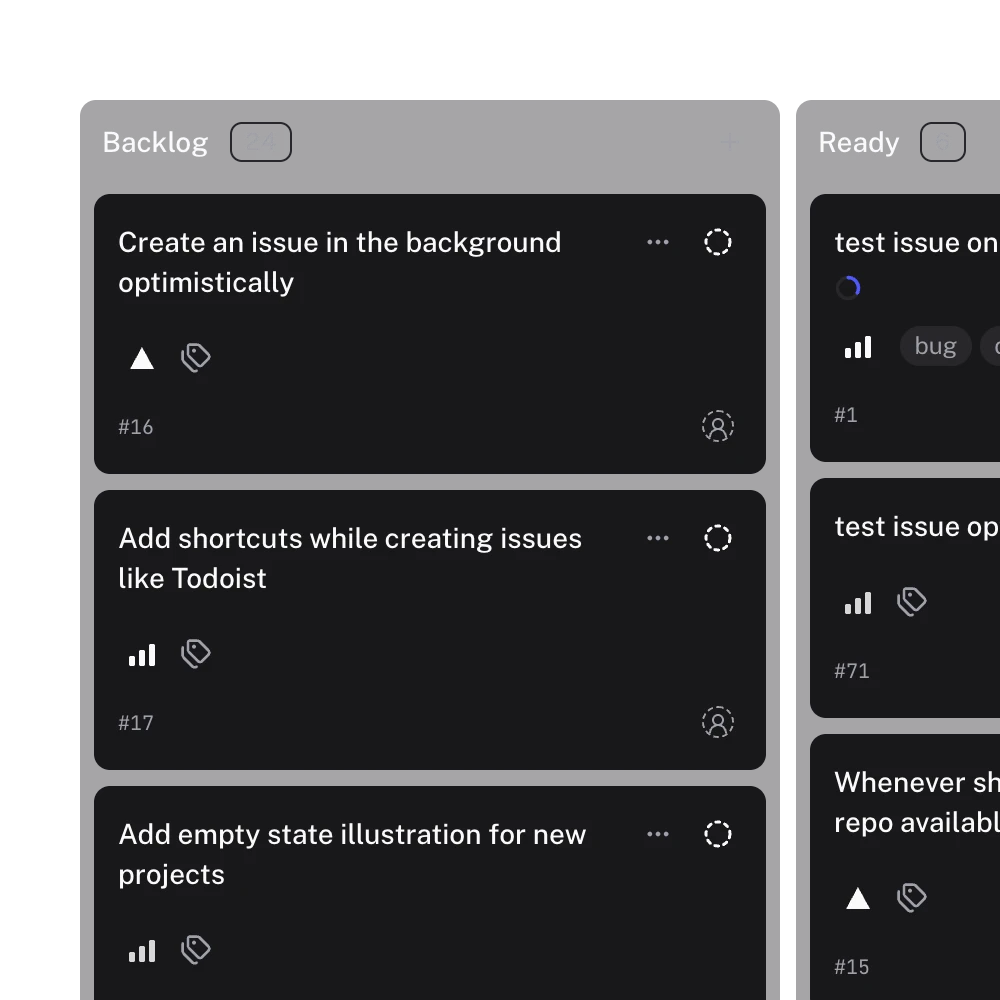
This is a real Gitsu interface image. It shows the Backlog and Ready distinction; it is not a capture of the illustrative export task.
During review, filter the project to Backlog and select items that genuinely share a decision. Gitsu's bulk-edit mapping supports project fields, assignees, labels, milestones and issue state. For example, move a group of accepted tasks to Ready after reviewing them. Avoid selecting the entire backlog just to make the board look tidy. Read failures before assuming every selected issue changed.
The benefit is practical: capture and review use the same client that displays the work. Teammates can continue using github.com because Gitsu writes to the same GitHub records. Gitsu does not remove the need to make a decision about each task.
What should you check before using Gitsu for the backlog?
Check the loaded project scope, plan requirements and ownership of the review routine before treating the list as complete.
Gitsu shows one project at a time and loads at most 2,000 items per project. Wait for loading and read any cap warning. A backlog spread across several projects needs separate reviews; this guide does not promise one combined queue.
The web board is free. The macOS app and MCP need a paid Seat through Pro or Team; the pricing page has current terms. This routine uses ordinary board controls and does not require an agent. Gitsu has no notifications inbox, so returning to the review remains a human responsibility.
Open your GitHub project in Gitsu, capture the next deferred task, and review Backlog alongside Ready. Issue creation and bulk field updates let you record the team's decisions in one client while everyone keeps the same GitHub issues.
How we checked
A capture-and-review routine checked against Gitsu issue composition, project-field filters and bulk mutation mapping. The real Gitsu screenshot shows Backlog and Ready lanes; example tasks are illustrative, not a measured customer study.
- https://docs.github.com/en/issues/tracking-your-work-with-issues/using-issues/creating-an-issue
- https://docs.github.com/en/issues/planning-and-tracking-with-projects/managing-items-in-your-project/adding-items-to-your-project
- https://docs.github.com/en/issues/planning-and-tracking-with-projects/understanding-fields/about-single-select-fields
- https://docs.github.com/en/issues/planning-and-tracking-with-projects/customizing-views-in-your-project/managing-your-views
- https://docs.github.com/en/issues/planning-and-tracking-with-projects/customizing-views-in-your-project/filtering-projects
Frequently asked questions
How do I create a backlog in GitHub Issues?
Create issues in the relevant repositories, add them to a GitHub project, and use a Backlog Status value for deferred work. Keep a separate Ready value for work the team has agreed to start. These names are a suggested convention, not required GitHub defaults.
Should low-priority GitHub issues stay open?
Keep a low-priority issue open when the team still wants to consider the work and its description gives a future reviewer enough context. Close it when the team decides against doing it, and record the reason. An open backlog issue should not imply a delivery promise.
Does a GitHub backlog need sprints?
No. A backlog can use Status and Priority without an iteration field. Add iterations when the team has a real planning cadence that needs them, rather than treating every deferred idea as sprint work.
Can Gitsu remind me about forgotten backlog items?
Gitsu supports issue creation, filtering and bulk editing in a selected GitHub project. This workflow relies on a person returning to review the backlog; it does not provide an automatic reminder or recover tasks nobody recorded.
Is Gitsu free for backlog review?
The Gitsu web board is free. The macOS app and MCP require a paid Seat through Pro or Team. Gitsu shows one project at a time and loads up to 2,000 items per project, so a visible list may not include every item on GitHub.
Try it on your own boardsGitsu opens your GitHub Projects boards in the browser. Sign in with GitHub and work on the same issues your team already uses.
Open the web app