GitHub has a Kanban board built in. Switch a GitHub Projects view to the Board layout, set the column field to Status, and each column becomes a state your issues and pull requests can be in. This guide shows how to create one, what the columns really do, which board features GitHub has and which it does not, and how to run the same board in Gitsu.
Is there a Kanban board on GitHub?
Yes. The Board layout of a GitHub project spreads its issues, pull requests and draft issues across columns, and setting the column field to a Status field gives you a Kanban board. A project is the table, board or roadmap over the work you add to it, and a card on the board is the issue itself, so a change you make on the card shows on the issue.
Searching for a GitHub Kanban board also turns up open-source Kanban apps that live in GitHub repositories, such as Kanboard and PLANKA. Those are separate programs you host yourself, with their own boards and database. Their cards are not your GitHub issues. Kanboard's README says the project is in maintenance mode. If you want your repository's issues on a board, you want GitHub Projects.
Is the GitHub Kanban board free?
Yes. GitHub's pricing page lists Issues and Projects on the Free plan, and that plan includes unlimited public and private repositories. A board over private-repository issues needs no paid plan. The free-plan guide covers the item limits and who can see a private issue on a board.
How do I create a Kanban board in GitHub Projects?
Create a project with the Board layout, then add work to it.
- On github.com, open your profile or your organization and click Projects.
- Click New project.
- Under "Start from scratch", click Board. To start from a ready-made setup instead, pick a built-in template such as Kanban.
- Name the project. On an organization project, optionally tick Import items from repository to start with that repository's issues on the board.
- Click Create project.
An existing project can also gain a board: click View next to the search bar, then pick Board under "Layout". Each view keeps its own layout, so a table and a board can sit side by side over the same items.
How do columns and Status work on a GitHub board?
The columns are the values of one field, and dragging a card writes the column's value to the card. The board layout is based on the Status field by default, and you can choose any other single-select or iteration field as the column field from View → Column field. Drag an item from In progress to Done and its Status becomes Done.
Three things you will meet early:
- Automation. When a project is created, two workflows are on: closing an issue or pull request sets its status to Done, and merging a pull request sets it to Done. Other workflows, such as setting Todo when an item is added, are one click away on the Workflows page. The automation guide covers them.
- Column limits. Click the column's menu and choose Set column limit to type a card limit. The column shows its count against the limit and highlights when it is over. The limit is advice: it does not stop anyone, or any automation, from adding more cards, and it applies only to that view.
- Sorting and grouping. Sorting a board turns off manual reordering within a column, although you can still move cards between columns. Grouping by a field adds horizontal sections, and dragging a card into a section applies that section's value.
For a quicker start, GitHub's built-in Kanban template creates five views: Backlog, Priority board, Team items, Roadmap and In review. The templates guide lists what every template creates and what a copy leaves behind.
How is a GitHub project board different from Jira?
A GitHub board is a view over GitHub's own issues, so the board and the issue never disagree. Jira is a separate tracker: it has its own issues, its own workflows and its own administration, and it links to GitHub rather than being it. Choose the GitHub board when the work lives in repositories and the team is small. Choose Jira when you need enforced workflows, sprint reports such as velocity and burndown, or non-engineers working on the board. The GitHub Projects vs Jira comparison goes through pricing and features.
How do I run my GitHub Kanban board in Gitsu?
Open the project in Gitsu and press G B. Gitsu is a client for the same GitHub Projects boards, so the board you see is the GitHub board and every move is written back to it.
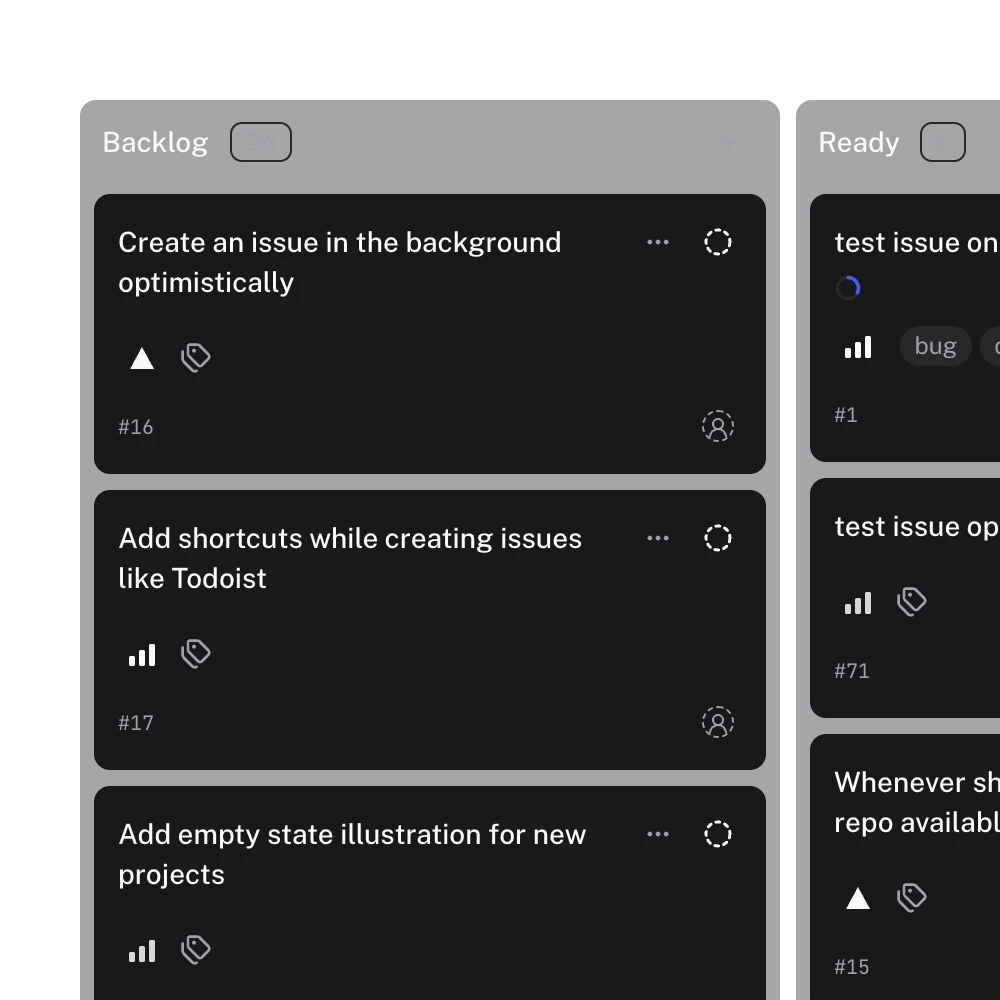
What the board does, from its code:
- Columns follow the Status field by default. Use Columns to pick any single-select, iteration or milestone field instead, for example one lane per sprint. Items with no value land in a trailing "No status" lane, so none disappear.
- A drop is a write to GitHub. Dropping a card in another lane sets the lane's field value on the item, and dropping it between cards also writes its position in the project. If GitHub refuses the lane change, the card returns to its old lane.
- Move cards from the keyboard. Press Space to lift a card, the arrow keys to move it, Space to drop it and Escape to cancel.
- File an issue into a lane. The create button on a lane header, and the composer at the foot of the lane, create an issue with that lane's Status already set. The composer takes a title plus priority, milestone and assignee.
- Filters carry over. The board uses the same filter syntax as the list, so a
label:bugfilter narrows the board too.
What it leaves out:
- No column limits. A lane header shows its name and card count only. Set limits on github.com if you want them; Gitsu does not enforce or display them.
- Milestone columns are read-only. You can lay a board out by milestone, but cards cannot be dragged on it. Open a card to change its milestone.
- A board needs a Status field. If the project has none, the board asks you to add one on GitHub.
- One project at a time, up to 2,000 loaded items. Check the loading notice before treating a long column as everything on GitHub.
The Gitsu web app is free, and the macOS app, AI features and MCP need a paid Seat. See pricing for current amounts.
Which should I use next?
If your team lives on github.com and a board a few clicks deep is fine, use the native Board layout above. If you drag cards all day and want a faster board that still writes every move to your GitHub project, open the project in the free Gitsu web app at dash.gitsu.app and press G B.
How we checked
How Gitsu's board picks its columns, what a drop writes to GitHub, and the board features it leaves out (no column limits, read-only milestone columns), read from the board model and drop transaction in this repo.
- https://docs.github.com/en/issues/planning-and-tracking-with-projects/customizing-views-in-your-project/customizing-the-board-layout
- https://docs.github.com/en/issues/planning-and-tracking-with-projects/customizing-views-in-your-project/changing-the-layout-of-a-view
- https://docs.github.com/en/issues/planning-and-tracking-with-projects/learning-about-projects/about-projects
- https://docs.github.com/en/issues/planning-and-tracking-with-projects/learning-about-projects/quickstart-for-projects
- https://docs.github.com/en/issues/planning-and-tracking-with-projects/automating-your-project/using-the-built-in-automations
- https://github.com/pricing
- https://github.com/kanboard/kanboard
- https://github.com/plankanban/planka
Frequently asked questions
Is there a Kanban board on GitHub?
Yes. GitHub Projects has a Board layout that spreads issues, pull requests and draft issues across columns. Set the column field to Status and you have a Kanban board. It is a view of your GitHub issues, so moving a card changes the issue.
Is the GitHub Kanban board free?
Yes. GitHub's pricing page lists Issues and Projects on the Free plan, which includes unlimited public and private repositories. You do not need a paid plan for a board.
What is a GitHub project board?
A project is a table, board or roadmap over the issues and pull requests you add to it. A board is one layout of a project: it groups the items into columns by a single-select or iteration field, and a change you make in the project shows on the issue.
How is a GitHub project board different from Jira?
A GitHub board is a view over GitHub's own issues and pull requests, so there is no second record to sync. Jira is a separate tracker with its own issues, workflows and administration. The GitHub Projects vs Jira comparison covers where each one wins.
Does GitHub limit how many cards a column can hold?
Only as a signal. GitHub lets you set a limit on the number of items in a column, and the column highlights when it is over the limit, but nothing stops anyone, or any automation, from adding more cards. Gitsu's board does not show these limits.
Try it on your own boardsGitsu opens your GitHub Projects boards in the browser. Sign in with GitHub and work on the same issues your team already uses.
Open the web app